Agents window: Search tab needs an empty state (design + prototypes)
- Dominant language
- TypeScript
- Stars
- 193k
- Forks
- 42.4k
- PR merge metrics
- PR metrics pending
Description
## Recommendation
Ship an empty state for the Search tab, and go with **Variant B (the top hint)**. In the study, both variants read clearly as "search across files," but the participants who stated a preference favored the hint version, and overall clarity landed around 6 out of 7. The strongest improvement signal was not about which layout to pick: **more than half of participants asked for example searches or sample commands** on the empty screen to show what they can search for. Recommended plan: ship Variant B now, then fast-follow with a small set of example searches. Because both designs validated well, no redesign of the empty state itself is proposed; the remaining opportunities are additive.
## Demo
Recorded from a real Code OSS build (not a mockup). Both demos show the full Agents window for context and confirm the empty state hides while typing and returns when the query is cleared.
### Variant B - Top hint (recommended)
A compact hint anchored just below the search box: *"Type above to search for text across files in your workspace."*
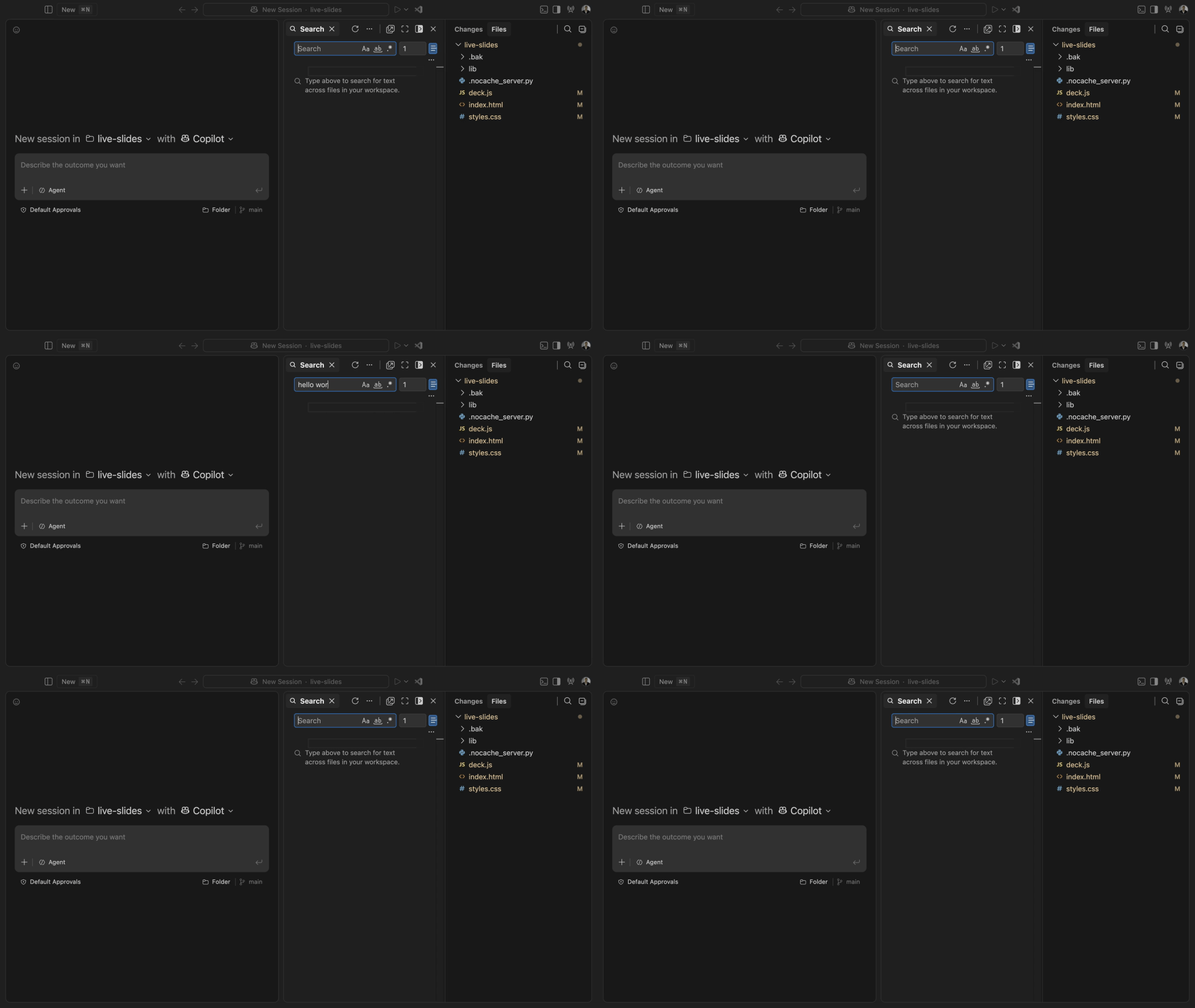
Full quality MP4: https://github.com/microsoft/vscode/blob/eli/search-tab-empty-state-demo/demo/search-tab-empty-state/variant-B-hint.mp4
### Variant A - Centered (mirrors the Browser empty state)
A centered search icon, a **Search** title, and a one line subtitle: *"Search for text across files in your workspace."*
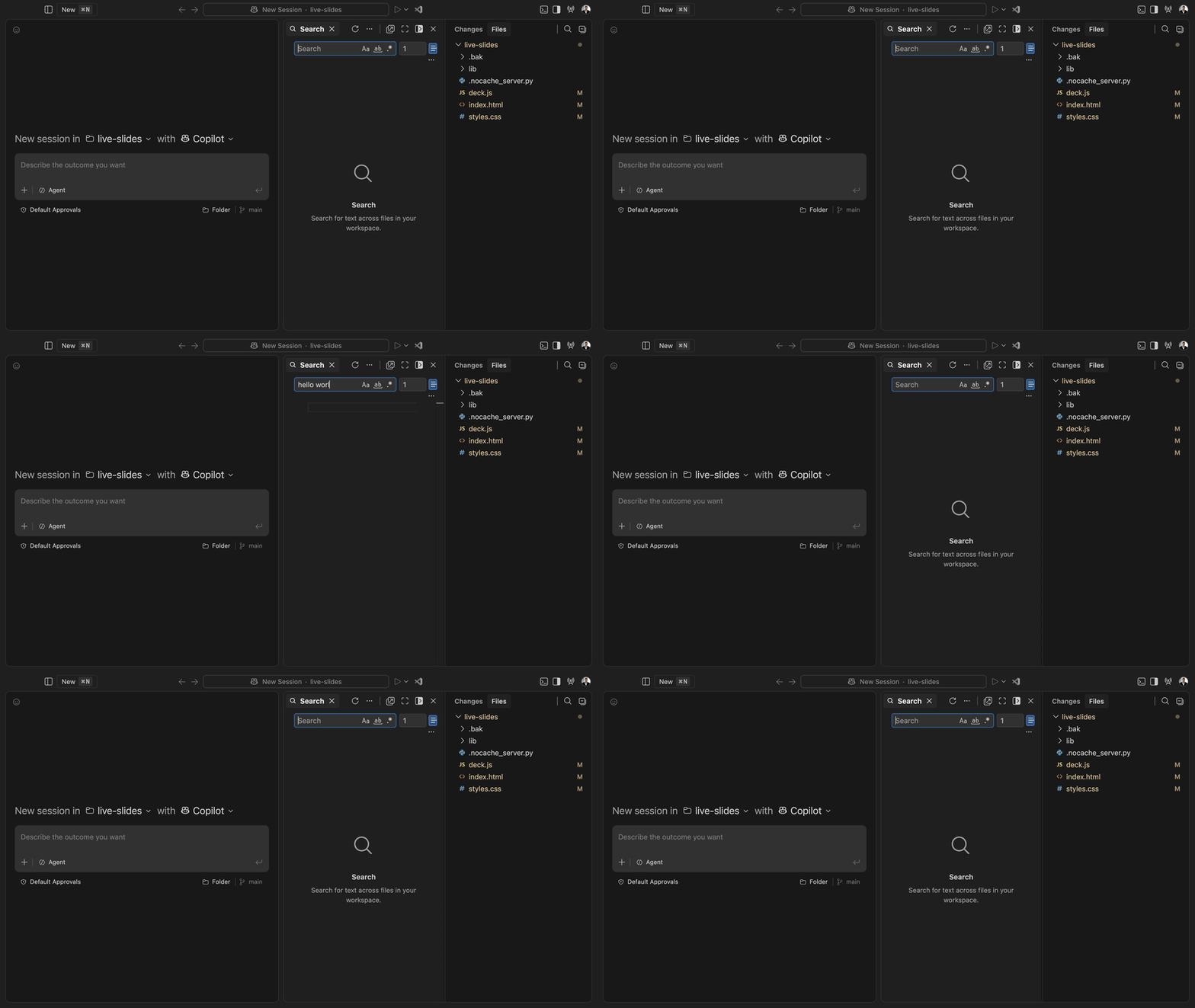
Full quality MP4: https://github.com/microsoft/vscode/blob/eli/search-tab-empty-state-demo/demo/search-tab-empty-state/variant-A-centered.mp4
## Problem
The Search tab in the secondary panel of the Agents window showed a blank content area when there was no query or results. It needed an empty state that matches the Browser tab styling but explains the tab is for searching across files. Both variants reuse the Browser tab empty state tokens and are gated behind an experimental setting (`search.searchEditor.emptyState`), appearing only when there is no query and no results.
## What we heard
Think out loud study, 5 participants (coders and vibe coders who use AI assistants). Signals are directional given the small sample.
- **The empty state works.** Both variants were understood as searching across files, with overall clarity around 6 out of 7. *"They both did say searching for across files."* (P45)
- **Variant B (hint) was preferred.** The participants who stated a preference chose the hint version as clearer about the scope of search. *"The second version made it much more clearer, the scope of search ... the second version is the winner."* (P52)
- **More than half want example searches.** The most common request was to fill the empty space with example queries or sample commands as guidance. *"Why can't you have some example questions ... give some guidance to the newcomers."* (P52)
- **Some want the label more prominent.** *"If it was in bigger font ... or a different color ... make it pop out more."* (P45)
- **Some confusion between Search and Copilot in the same window.** A couple of participants wanted the empty state to help distinguish plain Search from the AI in the same surface. *"You have copilot over there and here search, how is it different from that ai?"* (P52)
- **Expectations match the feature.** Participants expect global, project wide search for files, keywords, functions, variables, and error strings, which is exactly what this tab does. *"I expect a global search functionality ... scan across my entire workspace."* (P69)
## Suggested next steps
1. Ship **Variant B (top hint)** as the empty state.
2. Fast follow: add a small set of **example searches / sample commands** in the empty space (the top requested improvement).
3. Consider making the hint slightly more prominent, and a light touch to distinguish Search from the AI in the same window.
## Telemetry
A directional, on topic telemetry pull (Search adoption and frequency on Stable desktop) was attempted via the data agent this run but the telemetry cluster was not reachable (VPN), so no live numbers are included here and none were estimated. The query set is prepared and can be run to confirm magnitudes. As background, find in files / Search is a core, frequently used surface in VS Code, which supports investing in a clear empty state; keyboard and palette telemetry would undercount real usage since mouse driven searches are not captured.
## Method and links
- Study: think out loud, 5 participants, both variants shown as full context screenshots with spoken prompts.
- Study review: https://app.usertesting.com/workspaces/408945/test/e68d24ae-3692-4c7e-8f9e-6f635165d489/review
- Preview: https://participant.use2.usertesting.com/px/#/preview/pre-study?participantId=291eb263-34e8-44bb-841d-2a9ab88a693b
- Prototype code touches the Search Editor (`src/vs/workbench/contrib/searchEditor/browser/`). Demo media lives on the `eli/search-tab-empty-state-demo` branch and can be removed once a direction is chosen.
Contributor guide
Assessment
This issue has not been assessed yet.