microsoft / microsoft/vscode-remote-release
Dev Container Templates: Long description of options cannot be displayed
Nobody has claimed this yet.
- Dominant language
- Dockerfile
- Stars
- 4.2k
- Forks
- 470
- Avg merge
- 1d 1h
- Merged PRs (30d)
- 1
Description
This is not a major problem, but it seems that my written explanation of the options is too long to fit in the UI.
If there is some help, such as a mouse hover to display the full text in a tooltip, I would appreciate it.
(I'd really like to make this description shorter too, but it seems difficult to cut it down any further)
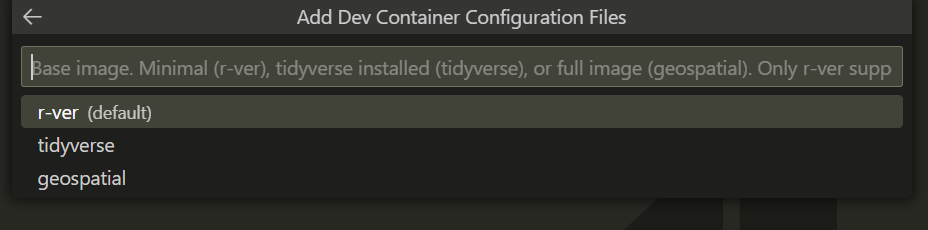
- VSCode Version: 1.73.0-insider
- Local OS Version: Windows 11
- Remote OS Version: NA
- Remote Extension/Connection Type: Containers
Steps to Reproduce:
- Add Dev Container Configuration files
- Select
R (rocker/r-ver base)-> select options
Contributor guide
First steps
- Read the whole issue, then the project's contributing guide.
- Comment on the issue to say you are picking it up — it saves two people doing the same work.
- Fork the repository and make your change on a branch.
- Open a pull request that references the issue number.
Research direction
Start by reproducing the issue through the Dev Container Configuration flow, selecting R (rocker/r-ver base) and then its options. Inspect src/r-ver/devcontainer-template.json around line 22 and compare the displayed description with the full text; done means the complete explanation is accessible in the options UI, such as through a tooltip.
Written by the indexing model from the issue text.
Assessment
- Tech stack
- docker, vscode
- Domain
- developer-experience, tooling
- Issue type
- Bug
- Difficulty
- 3/5
- Estimated time
- 1-2 days
- Activity status
- Stale
- Clarity
- Mostly clear
- Newbie friendliness
- 35/100