microsoft / microsoft/vscode-remote-release
Auto-detect docker in WSL when not available in Windows
Open
@chrmarti is already working on this.
Since Jun 13, 2022.
containers
feature-request
- Dominant language
- Dockerfile
- Stars
- 4.2k
- Forks
- 470
- Avg merge
- 1d 1h
- Merged PRs (30d)
- 1
Description
- VSCode Version: 1.68.0
- Local OS Version: Win11 22H2
- Remote OS Version: N/A
- Remote Extension/Connection Type: Containers/WSL
- Logs:
Steps to Reproduce:
Have docker installed in your default WSL2 distribution, but not in Windows itself (i.e. not through Docker Desktop, as it's not free). Reference guide: https://dev.to/felipecrs/simply-run-docker-on-wsl2-3o8

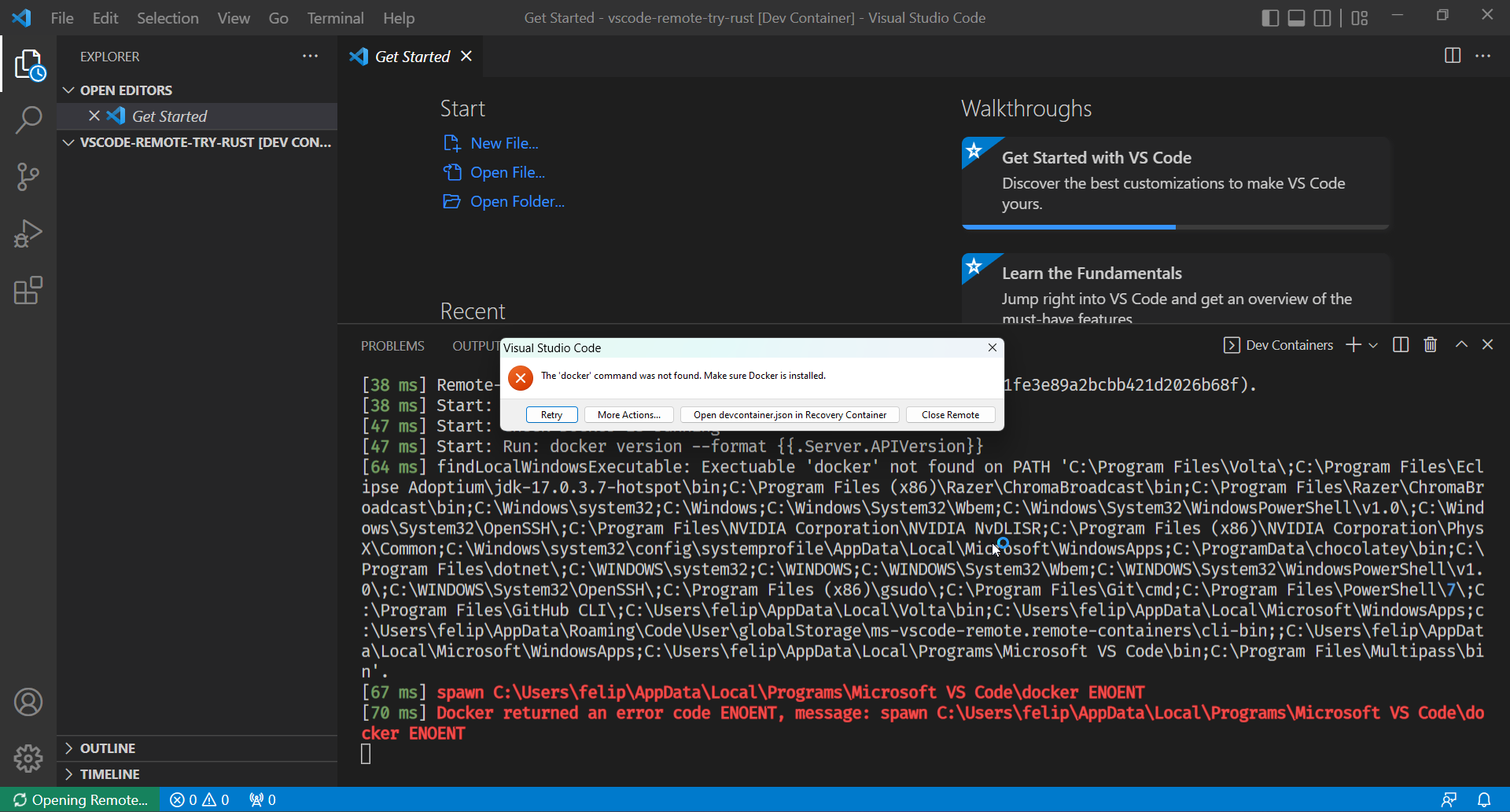
I suppose it should automatically be fallback to searching for docker in WSL2, as it works normally when I open the devcontainer from within VS Code itself.
Contributor guide
First steps
- Read the whole issue, then the project's contributing guide.
- Comment on the issue to say you are picking it up — it saves two people doing the same work.
- Fork the repository and make your change on a branch.
- Open a pull request that references the issue number.
Assessment
This issue has not been assessed yet.