microsoft / microsoft/vscode-remote-release
Ability to reload/reconnect all remote windows at once
Nobody has claimed this yet.
- Dominant language
- Dockerfile
- Stars
- 4.2k
- Forks
- 470
- Avg merge
- 1d 1h
- Merged PRs (30d)
- 1
Description
I use vscode remote development to connect to machines through a VPN. I usually have 5-10 different windows open, each connected to a remote.
After the VPN disconnects, this message shows up in every single one:
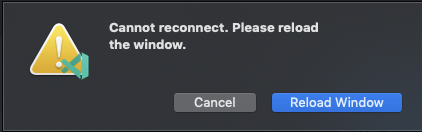
It would be great if it was possible to reload all the windows with one click!
Note that in the current version, I actually have to click Reload Window twice for every single window (but that is already being tracked in https://github.com/microsoft/vscode-remote-release/issues/1485).
Here's my version info:
Version: 1.44.0-insider
Commit: d8e3cca049b1baa317ab9ef0d3f673b08e53d8fa
Date: 2020-04-02T06:40:18.155Z
Electron: 7.1.11
Chrome: 78.0.3904.130
Node.js: 12.8.1
V8: 7.8.279.23-electron.0
OS: Darwin x64 18.7.0
Contributor guide
First steps
- Read the whole issue, then the project's contributing guide.
- Comment on the issue to say you are picking it up — it saves two people doing the same work.
- Fork the repository and make your change on a branch.
- Open a pull request that references the issue number.
Research direction
Start with the VS Code Remote Development overview linked in the issue and reproduce the workflow with several remote windows after a VPN disconnect. Done means a single action can reload or reconnect all affected windows, rather than requiring separate reloads for each one.
Written by the indexing model from the issue text.
Assessment
- Tech stack
- vscode
- Domain
- desktop, developer-experience
- Issue type
- Feature
- Difficulty
- 4/5
- Estimated time
- 3-5 days
- Activity status
- Stale
- Clarity
- Mostly clear
- Newbie friendliness
- 35/100