microsoft / microsoft/vscode-js-debug
ECONNREFUSED when Chrome launches with a "Restore pages?" prompt
@connor4312 is already working on this.
Since May 15, 2022.
- Dominant language
- TypeScript
- Stars
- 2k
- Forks
- 373
- Avg merge
- 1d 9m
- Merged PRs (30d)
- 6
Description
Describe the bug
I am super confused as to what I am supposed to do here. Bug submitting is different across the repos and I started with vscode. I did not expect a different form.
Here is what I have touched: there is an issue of the same name that is closed but has 2 comments after it was closed: Issue 1184. This issue was linked to from this issue
"Error running browser: connect ECONNREFUSED 127.0.0.1:41613": Issue 930. According to this page Submitting Bugs and Suggestions, I should look for duplicate issues. My issue seems to be a duplicate so not sure how to proceed. I am not entirely sure what to do with a duplicate issue for an issue that is already closed. My inference from this request was to piggy back on the existing issue so I left my original comment there as duplicate issues are frowned upon - don't know. the duplicate issue comment threw me off. please don't yell at me if I did the wrong thing. I will fix if you kindly suggest how I can fix anything I did incorrectly.
To Reproduce
Steps to reproduce the behavior:
- Start a node server on port 3000
- Use launch.json to debug with browser on localhost:3000
- Browser opens, shows "about:blank" and then closes.
- 2 alerts popup - one looks native to vs code and the other to windows.
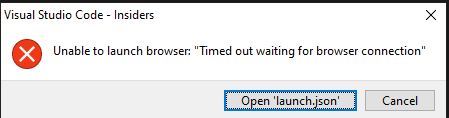

Log File
I added trace to the launch for chrome browser but there is no log in the debug console. I tested the flag with other configurations in launch.json and I saw it work so I believe I have the flag in the correct place. IF so, nothing.
{
 "name": "debug client-side",
 "type": "pwa-chrome",
 "request": "launch",
 "url": "http://localhost:3000",
 "trace": true
 }
However, when I add the flag to the server launch, the server won't start and I get this in the console:

VS Code Version:
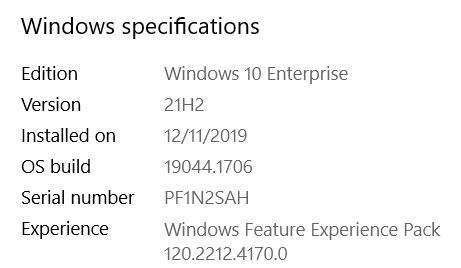
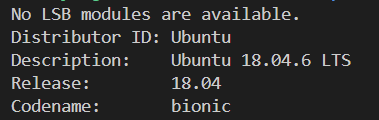
Additional context
Launching the browser does not always fail so this issue is intermittent but it fails enough it is unusable by me and currently I can't get a successful launch at all.
Contributor guide
First steps
- Read the whole issue, then the project's contributing guide.
- Comment on the issue to say you are picking it up — it saves two people doing the same work.
- Fork the repository and make your change on a branch.
- Open a pull request that references the issue number.
Assessment
This issue has not been assessed yet.