microsoft / microsoft/vscode-edge-devtools
[Feature]: Add and sync new style rules to chosen source file
Nobody has claimed this yet.
- Dominant language
- TypeScript
- Stars
- 827
- Forks
- 358
- Avg merge
- 20h 32m
- Merged PRs (30d)
- 10
Description
Environment (please complete the following information):
- OS (e.g., Windows 10): Windows 10
- Extension version (e.g., 1.2.3): 1.4.3
Describe the bug:
I was running my project with Live Server Extension. When I tried to add a New Style Rule for an element, the following error was occurred. Please find the attachment for the same. I thought that it can be removed by placing an inspector-stylesheet.css in the root directory. But it doesn't fix the issue.
Repro steps:
- Launch the extension
- Add a New Style Rule to an existing element in the HTML for the page
Expected behavior:
Feature Request:
Please provide an option to append and save the inspector-stylesheet style to any CSS file provided by the user. So that it can be helpful for the development.
Additional context:
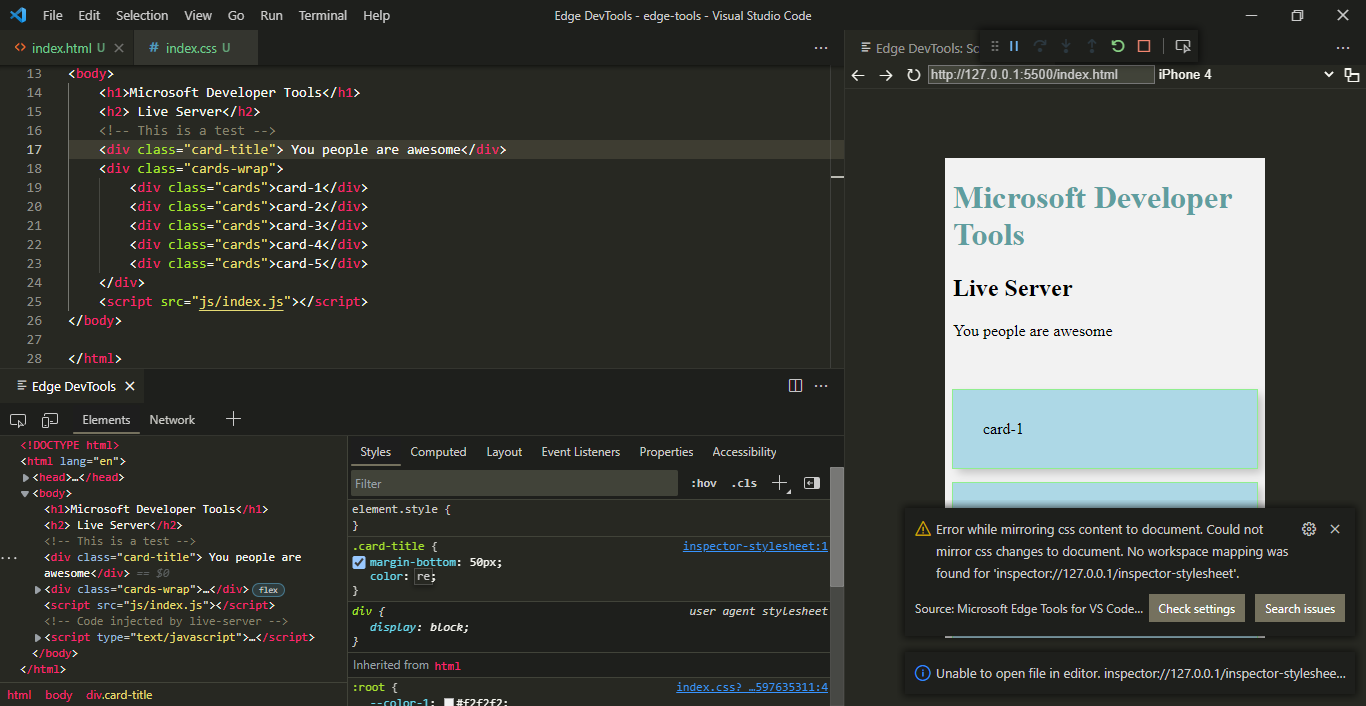
Contributor guide
First steps
- Read the whole issue, then the project's contributing guide.
- Comment on the issue to say you are picking it up — it saves two people doing the same work.
- Fork the repository and make your change on a branch.
- Open a pull request that references the issue number.
Research direction
The issue names no files or tests. Start by tracing the extension's New Style Rule flow and its handling of inspector-stylesheet.css; done means allowing the user to choose a CSS file and append and save the generated style rule there.
Written by the indexing model from the issue text.
Assessment
- Tech stack
- css, typescript
- Domain
- frontend, tooling
- Issue type
- Feature
- Difficulty
- 4/5
- Estimated time
- 3-5 days
- Activity status
- Stale
- Clarity
- Mostly clear
- Newbie friendliness
- 25/100