microsoft / microsoft/vscode-edge-devtools
Change "screencast" UI string to "browser"
@codepo8 is already working on this.
Since Oct 27, 2022.
- Dominant language
- TypeScript
- Stars
- 827
- Forks
- 358
- Avg merge
- 20h 32m
- Merged PRs (30d)
- 10
Description
Environment:
- OS (e.g., Windows 10): Win11
- Extension version (e.g., 1.2.3): 2.1.1
Describe the bug:
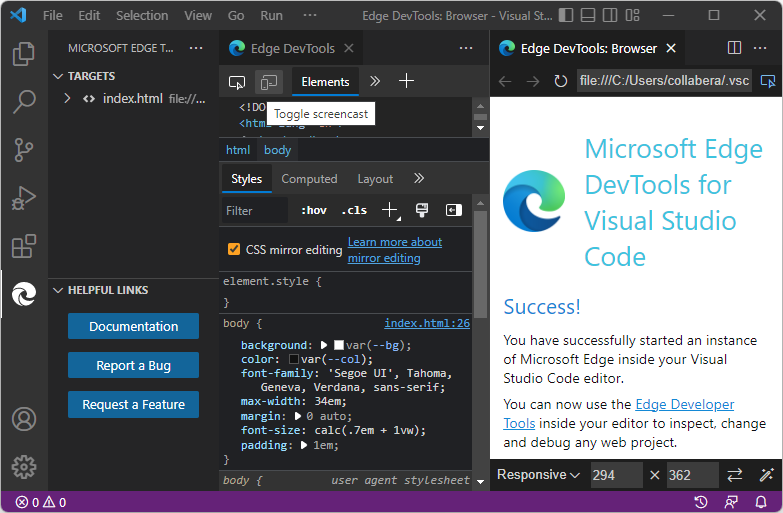
A couple tooltips say "Toggle screencast" but should say "Toggle browser".
Repro steps:
Instance 1: Activity Bar > Microsoft Edge Tools > Launch Instance button > Targets list > Hover on right side of target, hover over left icon.
Actual result: Tooltip reads "Toggle screencast".
Instance 2: In Edge DevTools tab, hover over icon in upper left >
Actual result: Tooltip reads "Toggle screencast".
Expected behavior:
Tooltip should read "Toggle browser".
Additional context:
Find "screencast" in files such as UI strings files, to see if there are any other instances that should be changed.

Contributor guide
First steps
- Read the whole issue, then the project's contributing guide.
- Comment on the issue to say you are picking it up — it saves two people doing the same work.
- Fork the repository and make your change on a branch.
- Open a pull request that references the issue number.
Assessment
This issue has not been assessed yet.