microsoft / microsoft/vscode-cpptools
std::vector size is missing in visualization
Open
Nobody has claimed this yet.
debugger
Feature Request
- Dominant language
- TypeScript
- Stars
- 6.2k
- Forks
- 1.7k
- Avg merge
- 14h 46m
- Merged PRs (30d)
- 61
Description
Environment
- OS and version: Fedora 35
- VS Code: 1.69.0
- C/C++ extension: C/C++
- GDB / LLDB version: GNU gdb (GDB) Fedora 12.1-1.fc35
Bug Summary and Steps to Reproduce
Bug Summary:
Hovering over a std::vector just shows {...}, where it should give the size. This is frustratingly ambiguous:
- If the vector is empty it shows only
{...} - If the debugger is broken and the output can't be parsed it shows only
{...} - One has to deduce the length by scrolling down to see the last index
- If there are more than 999 items, there is no way to know the length
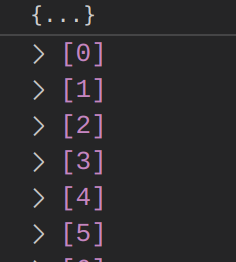
Perhaps this used to work, but parsing of the following, e.g. from the debug console, is failing (?):
-exec p myvector
$1 = std::vector of length 73, capacity 169 = { <items> }
Steps to reproduce:
- Set up gdb pretty printing as in https://github.com/microsoft/vscode-cpptools/issues/69
- Create a dummy source file with std::vector, empty or full
- Compile, build, launch debugger
- Hover over the std::vector variable, find it in "Locals" or add a "Watch". See that there is only
{...}
Debugger Configurations
{
    // Use IntelliSense to learn about possible attributes.
    // Hover to view descriptions of existing attributes.
    // For more information, visit: https://go.microsoft.com/fwlink/?linkid=830387
    "version": "0.2.0",
    "configurations": [
        {
            "name": "Launch (cppdbg)",
            "type": "cppdbg",
            "MIMode": "gdb",
            "request": "launch",
            "cwd": "${workspaceFolder}",
            "program": "${workspaceFolder}/a.out",
            "stopAtEntry": false,
            "externalConsole": false,
            "setupCommands": [
                {
                    "description": "Enable pretty-printing for gdb",
                    "text": "-enable-pretty-printing",
                    "ignoreFailures": true
                },
                {
                    "description": "Set Disassembly Flavor to Intel",
                    "text": "-gdb-set disassembly-flavor intel",
                    "ignoreFailures": true
                },
                {
                    "description": "Don't stop on SIGUSR1",
                    "text": "handle SIGUSR1 nostop noprint pass",
                    "ignoreFailures": true
                }
            ],
        }
    ]
}
Debugger Logs
=thread-group-added,id="i1"
GNU gdb (GDB) Fedora 12.1-1.fc35
Copyright (C) 2022 Free Software Foundation, Inc.
License GPLv3+: GNU GPL version 3 or later <http://gnu.org/licenses/gpl.html>
This is free software: you are free to change and redistribute it.
There is NO WARRANTY, to the extent permitted by law.
Type "show copying" and "show warranty" for details.
This GDB was configured as "x86_64-redhat-linux-gnu".
Type "show configuration" for configuration details.
For bug reporting instructions, please see:
<https://www.gnu.org/software/gdb/bugs/>.
Find the GDB manual and other documentation resources online at:
    <http://www.gnu.org/software/gdb/documentation/>.

For help, type "help".
Type "apropos word" to search for commands related to "word".
=cmd-param-changed,param="history save",value="on"
=cmd-param-changed,param="history filename",value="/home/pknowles/.gdb_history"
Warning: Debuggee TargetArchitecture not detected, assuming x86_64.
=cmd-param-changed,param="pagination",value="off"

This GDB supports auto-downloading debuginfo from the following URLs:
https://debuginfod.fedoraproject.org/
Enable debuginfod for this session? (y or [n]) [answered N; input not from terminal]
Debuginfod has been disabled.
To make this setting permanent, add 'set debuginfod enabled off' to .gdbinit.
Stopped due to shared library event (no libraries added or removed)
Loaded '/lib64/ld-linux-x86-64.so.2'. Symbols loaded.
[Thread debugging using libthread_db enabled]
Using host libthread_db library "/lib64/libthread_db.so.1".
Other Extensions
No response
Additional Information
No response
Contributor guide
First steps
- Read the whole issue, then the project's contributing guide.
- Comment on the issue to say you are picking it up — it saves two people doing the same work.
- Fork the repository and make your change on a branch.
- Open a pull request that references the issue number.
Research direction
No source file or test is named. Start by reproducing the issue with the provided GDB configuration and the std::vector pretty-printer output, then trace how that value is rendered in hovers, Locals, and Watch. Done means the visualization shows the vector size, including for empty vectors and vectors with more than 999 items.
Written by the indexing model from the issue text.
Assessment
- Tech stack
- cpp, typescript
- Domain
- devtools
- Issue type
- Bug
- Difficulty
- 4/5
- Estimated time
- 3-5 days
- Activity status
- Stale
- Clarity
- Mostly clear
- Newbie friendliness
- 35/100