microsoft / microsoft/vscode-cpptools
Incorrect value for `__SIZE_TYPE__` for cross compiler i686-elf-g++
Open
@michelleangela is already working on this.
Since Feb 17, 2022.
Feature Request
Feature: Configuration
Feature: IntelliSense Mode
Language Service
Visual Studio
- Dominant language
- TypeScript
- Stars
- 6.2k
- Forks
- 1.7k
- Avg merge
- 14h 46m
- Merged PRs (30d)
- 61
Description
Bug type: Language Service
Describe the bug
- OS and Version: Windows10 Home 20H2 19042.1526
- VS Code Version: 1.64.2
- C/C++ Extension Version: 1.8.4
- Other extensions you installed (and if the issue persists after disabling them):
- If using SSH remote, specify OS of remote machine: WSL2 - Archlinux x64
- A clear and concise description of what the bug is, including information about the workspace (i.e. is the workspace a single project or multiple projects, size of the project, etc).
Similar to #5457 , but using a cross compiler targeting i686-elf. It's a single project.
Steps to reproduce
- Create hearder or source which includes
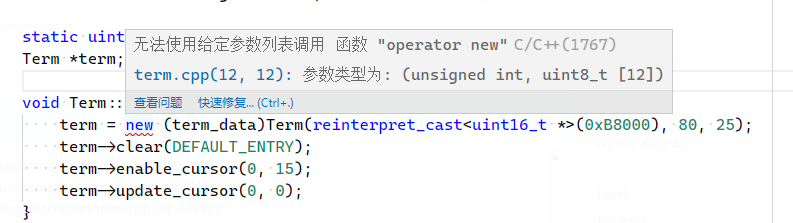
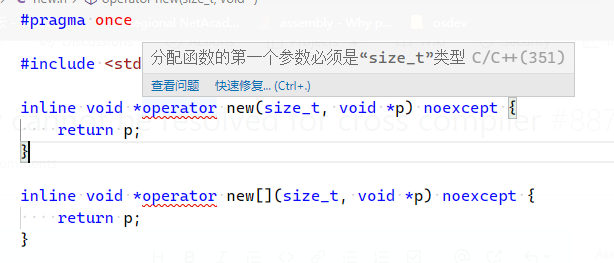
stddef.h, and declare placement operator new - Error message about size_t comes out.
Expected behavior
No message should be raised.
Code sample and logs
- Code sample
#pragma once

#include <stddef.h>

inline void *operator new(size_t, void *p) noexcept {
    return p;
}

inline void *operator new[](size_t, void *p) noexcept {
    return p;
}
- Configurations in
c_cpp_properties.json
{
    "configurations": [
        {
            "name": "cross-dev",
            "includePath": [
                "${workspaceFolder}/**"
            ],
            "defines": [],
            "cStandard": "c99",
            "cppStandard": "c++11",
            "intelliSenseMode": "gcc-x86",
            "compilerPath": "/home/nekosu/osdev/inst/bin/i686-elf-g++",
            "compilerArgs": [
                "-ffreestanding",
                "-Wall",
                "-Wextra"
            ]
        }
    ],
    "version": 4
}
-
Logs from running
C/C++: Log Diagnosticsfrom the VS Code command palette
Nothing comes out. I cannot find where it prints message (is it does). I've checked also subwindow inside output. -
Logs from the language server logging
快速信息操作失败: FE: 'Unknown error'
loggingLevel 已更改为: Debug
cpptools/didChangeCppProperties
$/setTraceNotification
cpptools/getCodeActions: /home/nekosu/nos/kernel/term.cpp (id: 11779)
cpptools/textEditorSelectionChange
cpptools/textEditorSelectionChange
cpptools/activeDocumentChange: /home/nekosu/nos/kernel/term.cpp
cpptools/getFoldingRanges: /home/nekosu/nos/kernel/term.cpp (id: 11780)
cpptools/getCodeActions: /home/nekosu/nos/kernel/term.cpp (id: 11781)
cpptools/textEditorSelectionChange
cpptools/getCodeActions: /home/nekosu/nos/kernel/term.cpp (id: 11782)
cpptools/textEditorSelectionChange
textDocument/definition: /home/nekosu/nos/kernel/term.cpp (id: 11783)
cpptools/getCodeActions: /home/nekosu/nos/kernel/term.cpp (id: 11784)
textDocument/didClose: /home/nekosu/nos/kernel/term.cpp
cpptools/getCodeActions: /home/nekosu/nos/kernel/term.cpp (id: 11785)
textDocument/didOpen: /home/nekosu/nos/kernel/term.cpp
正在检查语法错误: /home/nekosu/nos/kernel/term.cpp
正在为以下项的翻译单元中文件的 IntelliSense 更新进行排队: /home/nekosu/nos/kernel/term.cpp
cpptools/textEditorSelectionChange
cpptools/getDocumentSymbols: /home/nekosu/nos/kernel/term.cpp (id: 11786)
cpptools/textEditorSelectionChange
cpptools/getDocumentSymbols
cpptools/getSemanticTokens: /home/nekosu/nos/kernel/term.cpp (id: 11787)
cpptools/activeDocumentChange: /home/nekosu/nos/kernel/term.cpp
cpptools/getFoldingRanges: /home/nekosu/nos/kernel/term.cpp (id: 11788)
cpptools/getCodeActions: /home/nekosu/nos/kernel/term.cpp (id: 11789)
cpptools/finishUpdateSquiggles
错误波形曲线计数: 0
错误波形曲线计数: 1
正在终止子进程: 19063
更新 IntelliSense 时间(秒): 0.469
cpptools/getSemanticTokens: /home/nekosu/nos/kernel/term.h (id: 11790)
cpptools/getCodeActions: /home/nekosu/nos/kernel/term.cpp (id: 11791)
cpptools/getFoldingRanges: /home/nekosu/nos/kernel/term.cpp (id: 11792)
Screenshots
Additional context
cross compiler info:
i686-elf-g++ -v
使用内建 specs。
COLLECT_GCC=i686-elf-g++
COLLECT_LTO_WRAPPER=/home/nekosu/osdev/inst/libexec/gcc/i686-elf/11.2.0/lto-wrapper
目标:i686-elf
配置为:../../gcc-11.2.0/configure --target=i686-elf --prefix=/home/nekosu/osdev/inst --enable-nls --enable-languages=c,c++ --without-headers
线程模型:single
Supported LTO compression algorithms: zlib zstd
gcc 版本 11.2.0 (GCC)
Contributor guide
First steps
- Read the whole issue, then the project's contributing guide.
- Comment on the issue to say you are picking it up — it saves two people doing the same work.
- Fork the repository and make your change on a branch.
- Open a pull request that references the issue number.
Assessment
This issue has not been assessed yet.