microsoft / microsoft/vscode-cpptools
Strange inconsistency with comments showing on hover
Open
@sean-mcmanus is already working on this.
Since Dec 17, 2024.
bug
Feature: Doc comments
Language Service
- Dominant language
- TypeScript
- Stars
- 6.2k
- Forks
- 1.7k
- Avg merge
- 14h 46m
- Merged PRs (30d)
- 61
Description
Type: LanguageService
Describe the bug
- OS and Version: Win10 10.0.18363 Build 18363
- VS Code Version: 1.45.1
- C/C++ Extension Version: 0.28.2
- Other extensions you installed (and if the issue persists after disabling them): NA
- Does this issue involve using SSH remote to run the extension on a remote machine?: NA
- A clear and concise description of what the bug is, including information about the workspace (i.e. is the workspace a single project or multiple projects, size of the project, etc): Comments are being detected sometimes, and other times not. There appears to be some sort of 'rule set' governing when a comment is shown in the UI
Steps to reproduce
- Go to your header file
- Write comments on a couple lines
- Hover over them
- Only see the comments on one or two
Expected behavior
Seeing comments on anything with a comment above it
Screenshots

No comment

Removing the blank line above the comment fixes the problem
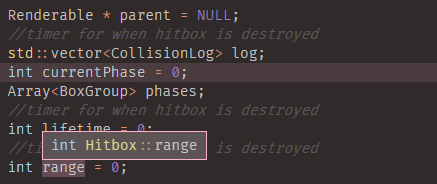
Comments don't show on any of them
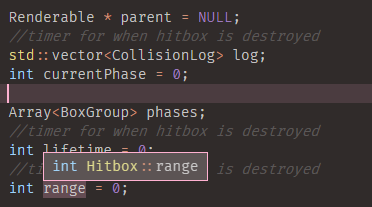
Comments don't show on any of them

Comment only for 'range' shows up for somehow
Contributor guide
First steps
- Read the whole issue, then the project's contributing guide.
- Comment on the issue to say you are picking it up — it saves two people doing the same work.
- Fork the repository and make your change on a branch.
- Open a pull request that references the issue number.
Assessment
This issue has not been assessed yet.