microsoft / microsoft/vscode-cpptools
[c++ on lldb][osx] moudle Containing this breakpoint has not yet loaded or the breakpoint address could not be obtained
@pieandcakes is already working on this.
Since Oct 16, 2018.
- Dominant language
- TypeScript
- Stars
- 6.2k
- Forks
- 1.7k
- Avg merge
- 14h 46m
- Merged PRs (30d)
- 61
Description
Environment data
VS Code version:1.28.0
C++ Extension version: 0.19.1-master
Debugger: lldb
OS: macOS Sierra/10.12.6
Steps to reproduce
1.Install vscode.
2.Install c++ extension.
3.Create a folder named test, create a file named main.cpp in test as following:

4.Compara project with command "g++ -g -o main.exe main.cpp" with cygwin64
5.Open vscode, open test folder, configure launch.json as following:
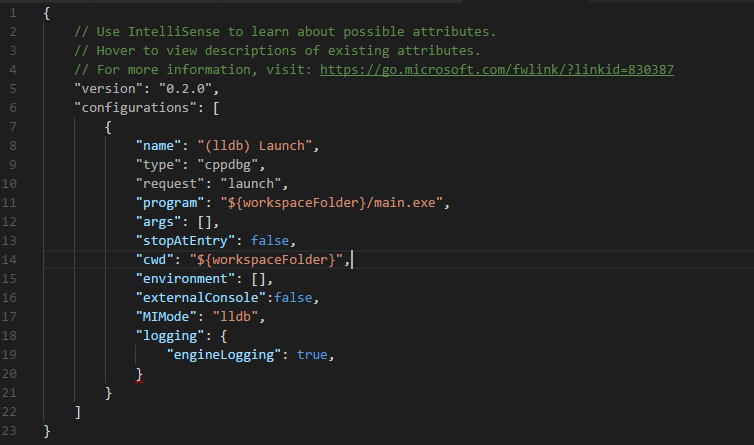
6.Set two bp as picture1
7.F5
8.Click "Add function BreakPoint" in BreakPoint and input "func()".
Expected
It can set function Breakpoint successfully
Actually
there are error in Debug Console window as following:

Contributor guide
First steps
- Read the whole issue, then the project's contributing guide.
- Comment on the issue to say you are picking it up — it saves two people doing the same work.
- Fork the repository and make your change on a branch.
- Open a pull request that references the issue number.
Assessment
This issue has not been assessed yet.