microsoft / microsoft/vscode-cpptools
[Windows][cygwin] The operation of 'Start Without Debugging' is invalid
Nobody has claimed this yet.
- Dominant language
- TypeScript
- Stars
- 6.2k
- Forks
- 1.7k
- Avg merge
- 14h 46m
- Merged PRs (30d)
- 61
Description
VSCode Version:1.23.0
OS Version: Window7 X64
Cpptools: \scratch2\scratch\waan\vsdbg-cpptools-test
GDB: C:\cygwin64\bin\gdb.exe
Steps to Reproduce:
-
Open tests folder in attachments directly.
test.zip -
Update "program" and "miDebuggerPath" in launch.json as following:
"program": "${workspaceRoot}/a.exe",
"miDebuggerPath": "C:\cygwin64\bin\gdb.exe", -
Set a breakpoint at line of 5 'int a=1' in a.cpp file.
-
Start without debugging(Ctrl+F5).
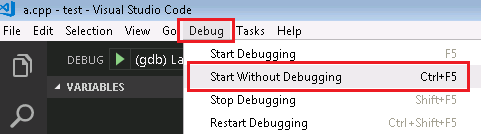
Excepted:
Start without debugging successfully.
Actual:
Start debugging and hit the breakpoint.
Investigation:
This issue didn't reproduce in vsdbg.
Contributor guide
First steps
- Read the whole issue, then the project's contributing guide.
- Comment on the issue to say you are picking it up — it saves two people doing the same work.
- Fork the repository and make your change on a branch.
- Open a pull request that references the issue number.
Research direction
Reproduce the report from the attached test.zip using the launch.json settings, a.cpp breakpoint, Cygwin gdb.exe, and Ctrl+F5. Compare the behavior with the stated vsdbg case; done means Start Without Debugging runs without starting a debugging session or stopping at the breakpoint.
Written by the indexing model from the issue text.
Assessment
- Tech stack
- cpp, vscode
- Domain
- devtools
- Issue type
- Bug
- Difficulty
- 4/5
- Estimated time
- 3-5 days
- Activity status
- Stale
- Clarity
- Mostly clear
- Newbie friendliness
- 35/100