microsoft / microsoft/vscode-cpptools
Debugger can't link against shared libs even if path/to/so is indicated.
Nobody has claimed this yet.
- Dominant language
- TypeScript
- Stars
- 6.2k
- Forks
- 1.7k
- Avg merge
- 14h 46m
- Merged PRs (30d)
- 61
Description
I try to debug my application with launch mode but it fails on linking shared libs. I indicated path to seek required lib.
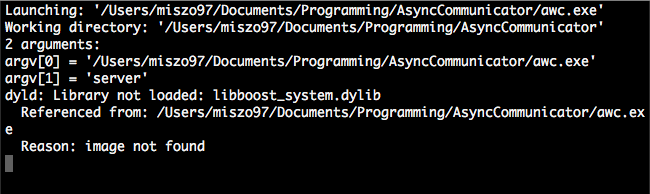
OS: macOS High Sierra 10.13.3
Vscode: Version 1.21.1 (1.21.1)
launch.json: https://pastebin.com/5ZAuXTKh
c_cpp_properties.json: https://pastebin.com/Mt9Vdsft
settings.json: https://pastebin.com/VwL4C9Vw
Contributor guide
First steps
- Read the whole issue, then the project's contributing guide.
- Comment on the issue to say you are picking it up — it saves two people doing the same work.
- Fork the repository and make your change on a branch.
- Open a pull request that references the issue number.
Research direction
Start by reviewing the linked launch.json, c_cpp_properties.json, and settings.json files, along with the macOS High Sierra and VS Code version details. Reproduce the launch-mode failure and determine whether the indicated shared-library path is being used; done means the application links successfully during debugging.
Written by the indexing model from the issue text.
Assessment
- Tech stack
- cpp, vscode
- Domain
- devtools
- Issue type
- Bug
- Difficulty
- 4/5
- Estimated time
- 3-5 days
- Activity status
- Stale
- Clarity
- Needs clarification
- Newbie friendliness
- 25/100