microsoft / microsoft/vscode-cpptools
Display Chinese char in normal not the digital in Debug panel
Open
Nobody has claimed this yet.
bug
debugger
- Dominant language
- TypeScript
- Stars
- 6.2k
- Forks
- 1.7k
- Avg merge
- 14h 46m
- Merged PRs (30d)
- 61
Description
- VSCode Version: Code 1.19.1 (0759f77bb8d86658bc935a10a64f6182c5a1eeba, 2017-12-19T09:46:23.884Z)
- OS Version: Windows_NT x64 10.0.16299
- Extensions:
| Extension | Author (truncated) | Version |
|---|---|---|
| cpptools | ms- | 0.14.5 |
when I remote debug a program with gdb.
the result:
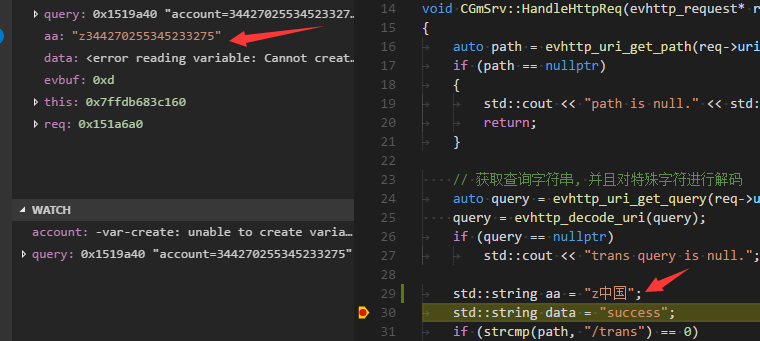
and my launch configuration is:
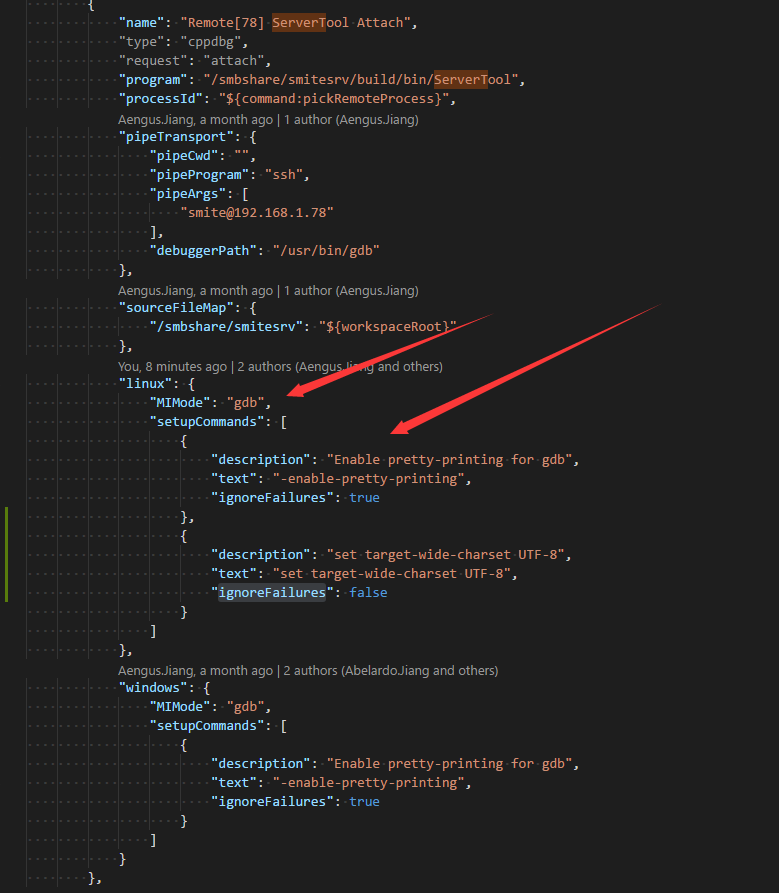
the remore host system is

Please help me to solve this issue.
thanks.
Contributor guide
First steps
- Read the whole issue, then the project's contributing guide.
- Comment on the issue to say you are picking it up — it saves two people doing the same work.
- Fork the repository and make your change on a branch.
- Open a pull request that references the issue number.
Research direction
Start by reproducing the remote-debugging case in the Debug panel using the reported VS Code 1.19.1, Windows host, remote GDB setup, and launch configuration. Compare how Chinese characters are rendered in the panel against the expected normal characters; done means the displayed values are readable rather than digital-looking.
Written by the indexing model from the issue text.
Assessment
- Tech stack
- cpp
- Domain
- devtools
- Issue type
- Bug
- Difficulty
- 4/5
- Estimated time
- 3-5 days
- Activity status
- Stale
- Clarity
- Needs clarification
- Newbie friendliness
- 25/100