microsoft / microsoft/vscode-cpptools
Add support for GDB Catchpoints
Nobody has claimed this yet.
- Dominant language
- TypeScript
- Stars
- 6.2k
- Forks
- 1.7k
- Avg merge
- 14h 46m
- Merged PRs (30d)
- 61
Description
Feature Request
While it is possible to set breakpoints in VS Code within a GDB debugging session, it is not possible to set catchpoints for e.g. syscalls from the GUI. Using the debug console it is possible with e.g. -exec catch syscall read but the Extension does not seem to recognize the catchpoints properly, since the following message is displayed, when hitting a catchpoint
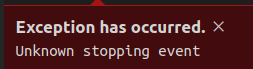
It would be good to add a handling for catchpoints which is similar to breakpoints into the extension.
Possible features are:
- Option to add catchpoints from the "Breakpoints" Section in the "Run and Debug" panel. Alternatively, a Catchpoints section could be added below breakpoints
- Display what catchpoint has been hit in the editor
With kind regards
Martin Schönstedt
Contributor guide
First steps
- Read the whole issue, then the project's contributing guide.
- Comment on the issue to say you are picking it up — it saves two people doing the same work.
- Fork the repository and make your change on a branch.
- Open a pull request that references the issue number.
Research direction
The issue names no files or tests; start by tracing the extension’s existing breakpoint handling and how GDB stop events are interpreted. Compare the requested catchpoint creation and hit display with current breakpoint behavior. Done means catchpoints can be added from the Run and Debug UI and a hit catchpoint is recognized and shown.
Written by the indexing model from the issue text.
Assessment
- Tech stack
- typescript, vscode
- Domain
- devtools
- Issue type
- Feature
- Difficulty
- 5/5
- Estimated time
- Over a week
- Activity status
- Stale
- Clarity
- Mostly clear
- Newbie friendliness
- 25/100