microsoft / microsoft/vscode-cmake-tools
When I use Quick debugging reports error: The editor could not be opened beause the file was not found
- Dominant language
- TypeScript
- Stars
- 1.7k
- Forks
- 546
- Avg merge
- 2d 16h
- Merged PRs (30d)
- 32
Description
### Brief Issue Summary
I am a new user of vscode-cmake-tools, when I follow this [https://code.visualstudio.com/docs/cpp/cmake-linux#_create-a-cmake-hello-world-project](url) , I can build, run and debug in Ubuntu20.
But when I followed the steps and excuted it in Windows, I can only build and run, but I can't debug, it reported an error: The editor could not be opened beause the file was not found.
All I used was the debug button in status bar or use ctrl+shift+p and type cmake debug, they look like the same.
The enviroment I used in Windows:

The error reported

**I think there is something wrong with the messy code on the E drive path in the picture above.**
It looks like it could not find the source files, but I do have the file in my directory:
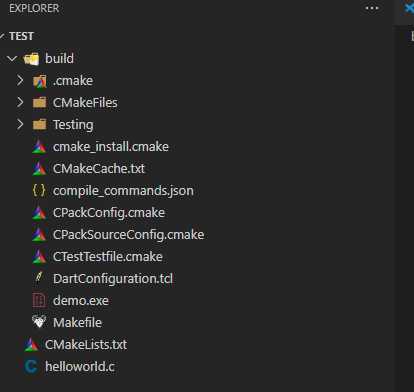
Hope to get your reply, thank you.
### CMake Tools Diagnostics
```shell
{
"os": "win32",
"vscodeVersion": "1.76.1",
"cmtVersion": "1.13.45",
"configurations": [
{
"folder": "e:\\coding\\test",
"cmakeVersion": "3.25.3",
"configured": true,
"generator": "Unix Makefiles",
"usesPresets": false,
"compilers": {
"C": "C:/msys64/usr/bin/gcc.exe",
"CXX": "C:/msys64/usr/bin/g++.exe"
}
}
],
"cpptoolsIntegration": {
"isReady": true,
"hasCodeModel": true,
"activeBuildType": "Debug",
"buildTypesSeen": [
"Debug"
],
"requests": [
"file:///e%3A/coding/test/helloworld.c"
],
"responses": [
{
"uri": "file:///e%3A/coding/test/helloworld.c",
"configuration": {
"includePath": [],
"defines": [],
"compilerPath": "c:/msys64/usr/bin/gcc.exe",
"compilerArgs": [],
"compilerFragments": [
"-g"
]
}
}
],
"partialMatches": [],
"targetCount": 29,
"executablesCount": 1,
"librariesCount": 0,
"targets": []
},
"settings": [
{
"communicationMode": "automatic",
"useCMakePresets": "auto",
"configureOnOpen": null
}
]
}
```
### Debug Log
_No response_
### Additional Information
_No response_
Contributor guide
Research direction
Reproduce the Windows setup in e:\coding\test using the reported CMake Tools diagnostics, helloworld.c, and the CMake Debug command. Start by tracing how the debug workflow resolves the reported file URI, then verify that debugging opens the existing source file instead of reporting it missing.
Written by the indexing model from the issue text.
Assessment
- Tech stack
- c, cmake, typescript, vscode
- Domain
- devtools, operating-systems
- Issue type
- Bug
- Difficulty
- 4/5
- Estimated time
- 3-5 days
- Activity status
- Stale
- Clarity
- Needs clarification
- Newbie friendliness
- 30/100