microsoft / microsoft/vscode-azurestaticwebapps
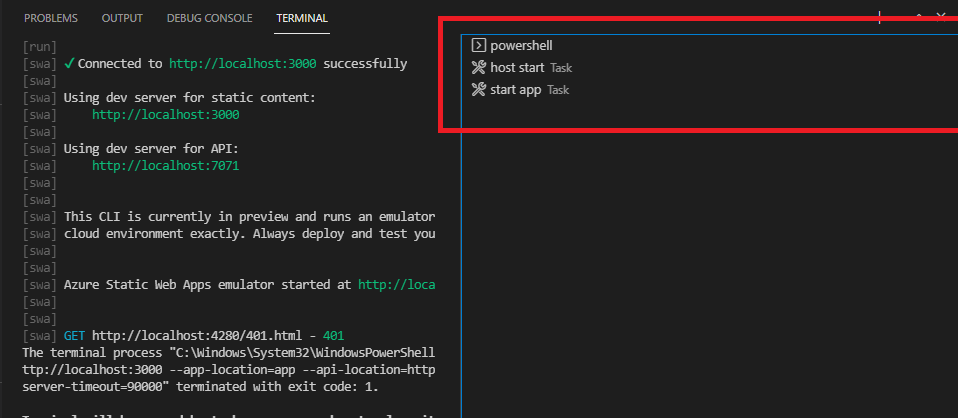
The check marks of terminal tabs disappear after closing the debug chrome browser window
Open
Nobody has claimed this yet.
AT-CTI
debugging
- Dominant language
- TypeScript
- Stars
- 99
- Forks
- 39
- Avg merge
- 3d 7h
- Merged PRs (30d)
- 2
Description
OS: Windows
Build Version: 20211118.1
Regression: Not a regression
Repro Steps:
- Clone https://github.com/alexweininger/ReactSite, open it in VS Code insider.
- In the terminal, change directory to 'app' folder, then run 'npm install'.
- Go to the 'Run and Debug' menu -> Select 'Azure Static Web Apps…' in the dropdown list -> Select 'SWA: Run app' -> Debug.
- Close it after the chrome browser window pops up.
- Check the check marks of terminal tabs doesn't disappear.
Expect:
The check marks of terminal tabs doesn't disappear.
Actual:
The check marks of terminal tabs disappear.
Contributor guide
No contributing guide indexed for this repository
First steps
- Read the whole issue, then the project's contributing guide.
- Comment on the issue to say you are picking it up — it saves two people doing the same work.
- Fork the repository and make your change on a branch.
- Open a pull request that references the issue number.
Research direction
Reproduce the issue from the Run and Debug menu using Azure Static Web Apps and the “SWA: Run app” entry point, then close the Chrome browser window. Inspect how terminal tab check marks change after the debug session ends; done means the check marks remain visible after closing the browser.
Written by the indexing model from the issue text.
Assessment
- Tech stack
- azure, typescript
- Domain
- cloud, tooling
- Issue type
- Bug
- Difficulty
- 4/5
- Estimated time
- 3-5 days
- Activity status
- Stale
- Clarity
- Mostly clear
- Newbie friendliness
- 35/100