microsoft / microsoft/vscode-azurestaticwebapps
There is no validation when inputting an App Setting name with more than 64 characters
Open
Nobody has claimed this yet.
AT-CTI
P3
- Dominant language
- TypeScript
- Stars
- 99
- Forks
- 39
- Avg merge
- 3d 7h
- Merged PRs (30d)
- 2
Description
OS: Win10
Build Version: 20210816.16
Regression: Not a regression
Repro Steps:
- F1 --> Azure Static Web App: Add New Setting... --> Select one Static Web App -> Select environment -> Input an App Setting name with more than 64 characters.
- Check whether there is a validation for the invalid app setting name.
Expect:
There is a validation "App setting key cannot be more than 64 characters in length.".
Actual:
There is no validation.
More Info:
- This issue also reproduces on the previous released Static Web Apps extension 0.7.1.
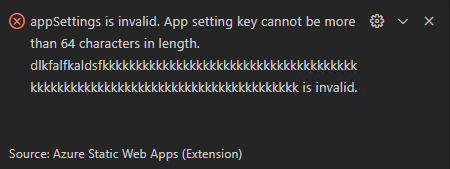
- An error occurs when adding the new setting which name contains more than 64 characters.
Contributor guide
No contributing guide indexed for this repository
First steps
- Read the whole issue, then the project's contributing guide.
- Comment on the issue to say you are picking it up — it saves two people doing the same work.
- Fork the repository and make your change on a branch.
- Open a pull request that references the issue number.
Research direction
Start in the Azure Static Web Apps extension's “Add New Setting” flow and trace how the App Setting name is handled before submission. Done means names over 64 characters show the specified validation message instead of reaching the failing add-setting operation.
Written by the indexing model from the issue text.
Assessment
- Tech stack
- azure, typescript, vscode
- Domain
- cloud, devtools
- Issue type
- Bug
- Difficulty
- 2/5
- Estimated time
- 1-3 hours
- Activity status
- Stale
- Clarity
- Clearly specified
- Newbie friendliness
- 35/100