microsoft / microsoft/vscode-azurestaticwebapps
[Codespaces] No error message pops up when entering the uppercase of the existing function name
Nobody has claimed this yet.
- Dominant language
- TypeScript
- Stars
- 99
- Forks
- 39
- Avg merge
- 3d 7h
- Merged PRs (30d)
- 2
Description
Environment: Remote Codespaces
Build Version: 20210622.6
Repro Steps:
- Click "Create HTTP Function..." button -> Create a HTTP Function with name "
HttpTrigger1". - Click "Create HTTP Function..." button -> Create a HTTP Function with name "
HTTPTrigger1". - Check whether pop up an error message.
Expect:
Pop up an error message, like below:

Actual:
No error message pops up and create the function "HTTPTrigger1" successfully.

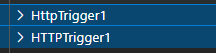
More Info:
Vice versa, there is no uppercase/lowercase character validation when entering a function name on Remote codespaces.
Contributor guide
No contributing guide indexed for this repository
First steps
- Read the whole issue, then the project's contributing guide.
- Comment on the issue to say you are picking it up — it saves two people doing the same work.
- Fork the repository and make your change on a branch.
- Open a pull request that references the issue number.
Research direction
Start by reproducing the duplicate function-name flow in Remote Codespaces using the Create HTTP Function command, then trace the validation used for function names. Done means creating HttpTrigger1 and HTTPTrigger1, in either order, produces the expected duplicate-name error instead of creating both functions.
Written by the indexing model from the issue text.
Assessment
- Tech stack
- azure, typescript, vscode
- Domain
- backend, devtools
- Issue type
- Bug
- Difficulty
- 3/5
- Estimated time
- 1-2 days
- Activity status
- Stale
- Clarity
- Mostly clear
- Newbie friendliness
- 35/100