microsoft / microsoft/vscode-azurestaticwebapps
Should the pre-fill selections assume the root?
Nobody has claimed this yet.
- Dominant language
- TypeScript
- Stars
- 99
- Forks
- 39
- Avg merge
- 3d 7h
- Merged PRs (30d)
- 2
Description
While creating a SWA with this extension, I was delighted to see that "Angular" was a baked in pre-fill selection. However, when I selected this, my app did not build properly. Here is why:
Angular app is not in the root of my repo
My angular app is in a folder app/ and my API is in a folder api/. The pre-fill assumed my app location was / which caused the build to fail.
Considerations
Should a developer have to choose "custom" if they have an Angular app where it is not in the root? Maybe. Is it obvious to a developer that having your angular app located somewhere other than the root of a repo requires custom? Probably not obvious.
This is very common in mono-repos. But it is also common when a repo has 2 projects in it, like a function app and a web framework (like angular).
Options
I would hate to add steps to the basic flow. If we could somehow detect where the app is (let's discuss web framework detection), then we could probably do this for the developer.
Without that detection, should we consider having a step to show them the app folder?
Why consider any of this?
Good question ... I fear that there will be a good number of people who have this situation and on their first try with the extension they may get a github action failure due to the wrong folders.
Angular is special, too
Angular also has a unique build location folder. It could either be one of these 2 in most scenarios (for an app named hello-world:
distdist/hello-world
The answer to this is in the angular.json file, but we'd need code to detect that.
Not sure how to handle this other than let the user see those settings.
What do other products do?
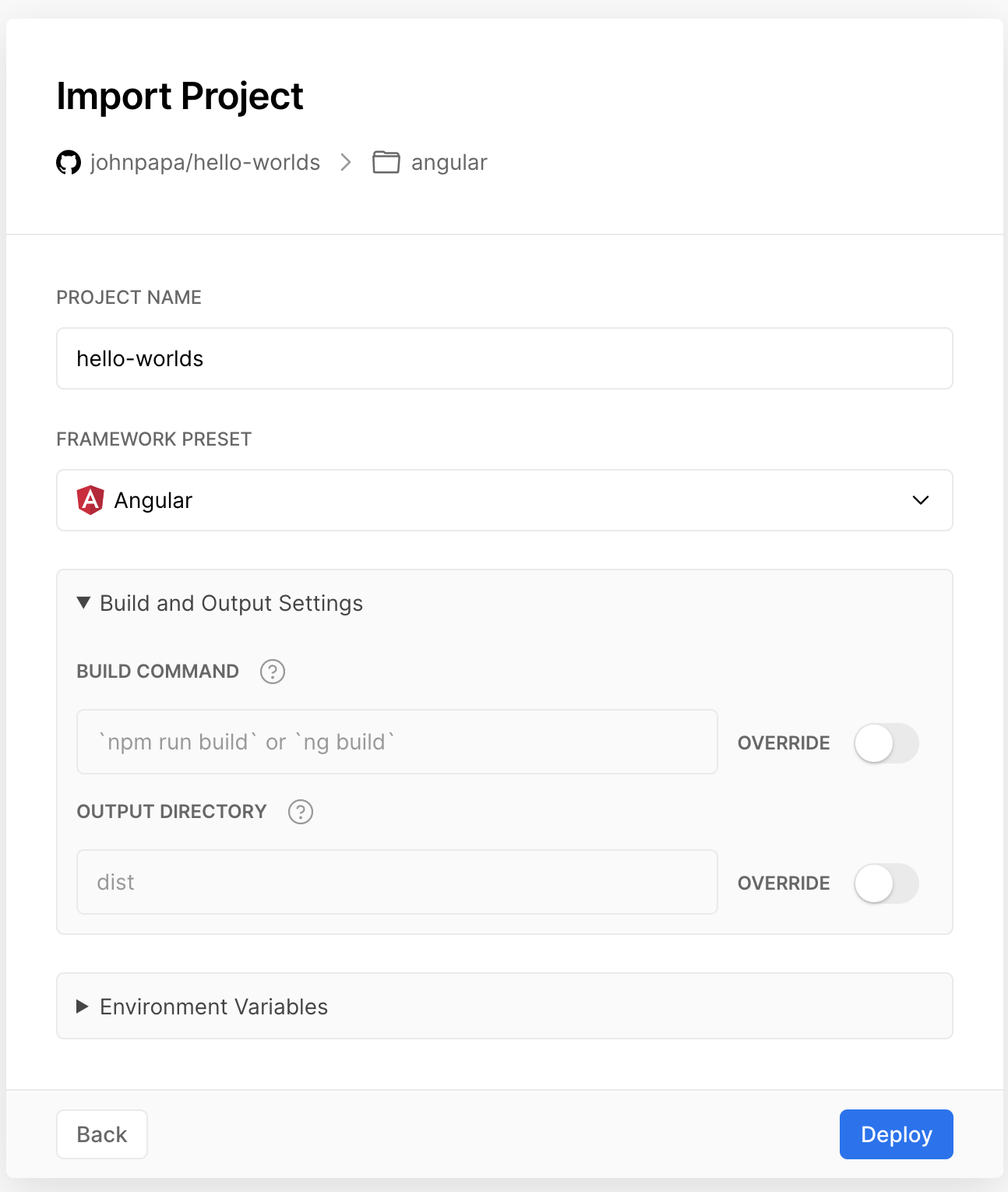
When using Vercel and selecting Angular, it finds the folder for the app. But more importantly here (IMO) it pre-fills the folder locations and shows them to the user. This allows the user to either continue OR edit them if they look wrong. see below
Contributor guide
No contributing guide indexed for this repository
First steps
- Read the whole issue, then the project's contributing guide.
- Comment on the issue to say you are picking it up — it saves two people doing the same work.
- Fork the repository and make your change on a branch.
- Open a pull request that references the issue number.
Research direction
Start by tracing the Angular pre-fill flow in the VS Code extension and review how angular.json exposes the app and build locations. Define whether the flow should detect nested apps or show editable paths; done means Angular projects outside the repository root receive correct, user-visible app and output locations.
Written by the indexing model from the issue text.
Assessment
- Tech stack
- angular, azure, typescript, vscode
- Domain
- cloud, developer-experience, devtools
- Issue type
- Feature
- Difficulty
- 5/5
- Estimated time
- Over a week
- Activity status
- Stale
- Clarity
- Needs clarification
- Newbie friendliness
- 25/100