microsoft / microsoft/vscode-azureresourcegroups
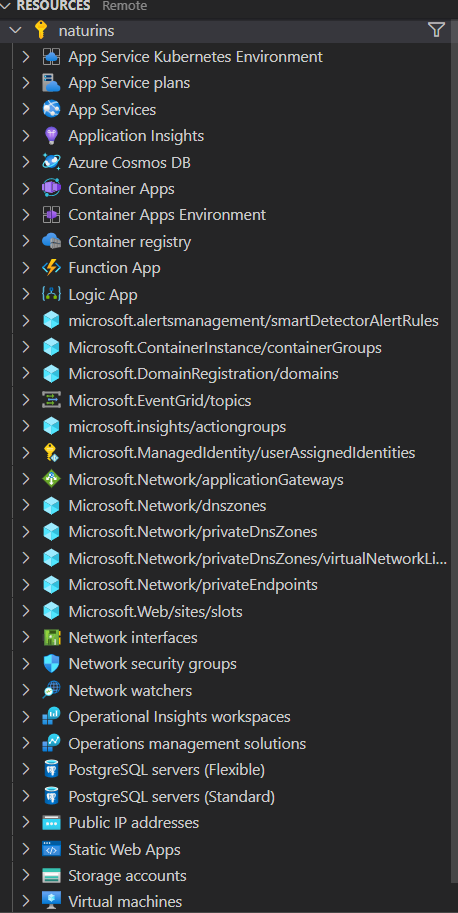
Sort Resource Type list by grouping our supported extensions at the top instead of pure alphabetical
Nobody has claimed this yet.
- Dominant language
- TypeScript
- Stars
- 78
- Forks
- 55
- Avg merge
- 16h 49m
- Merged PRs (30d)
- 139
Description
Somewhat related: https://github.com/microsoft/vscode-azureresourcegroups/issues/351
This is probably very much just a dev scenario, but we should probably group our extensions at the top. All of the groups that are labeled by the Microsoft provider type could probably stand to be at the bottom. I'm fine with keeping relevant resource types up there (such as App Service plans).
Contributor guide
No contributing guide indexed for this repository
First steps
- Read the whole issue, then the project's contributing guide.
- Comment on the issue to say you are picking it up — it saves two people doing the same work.
- Fork the repository and make your change on a branch.
- Open a pull request that references the issue number.
Research direction
The issue names no files or tests. Start by locating the Resource Type list and its current alphabetical sorting in the VS Code extension, then review the related issue #351 for context. Done means supported extension types appear first, while Microsoft provider groups remain below them and relevant resource types stay included.
Written by the indexing model from the issue text.
Assessment
- Tech stack
- azure, typescript, vscode
- Domain
- cloud, devtools
- Issue type
- Feature
- Difficulty
- 3/5
- Estimated time
- 1-2 days
- Activity status
- Stale
- Clarity
- Mostly clear
- Newbie friendliness
- 35/100