microsoft / microsoft/vscode-azureresourcegroups
The message to filter resources can be more annoying than showing the resources
Nobody has claimed this yet.
- Dominant language
- TypeScript
- Stars
- 78
- Forks
- 55
- Avg merge
- 16h 49m
- Merged PRs (30d)
- 139
Description
Does this occur consistently?
Repro steps:
- Create a default function app using basic create
- Expand the function app's resource group in the tree view
Expected
It shows all three resources (storage, function app, app insights)
Actual
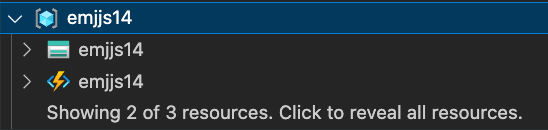
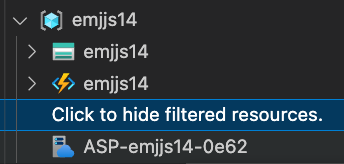
In both cases there are the same or more tree items (because of the messages) than if it had just displayed all resources in the first place. Also I'm not entirely sure why it's filtering - wouldn't 3 be well below any max from a "load more" situation? I would prefer a max of like 50 or something
Version: 0.5.5
OS: darwin
OS Release: 21.6.0
Product: Visual Studio Code
Product Version: 1.69.2
Language: en
Contributor guide
No contributing guide indexed for this repository
First steps
- Read the whole issue, then the project's contributing guide.
- Comment on the issue to say you are picking it up — it saves two people doing the same work.
- Fork the repository and make your change on a branch.
- Open a pull request that references the issue number.
Research direction
No file, test, or entry point is named in the issue. Reproduce the resource-group tree behavior with a default Azure Function app, then trace the filtering or resource-loading path. Done means the three expected resources appear without unnecessary filter messages, with the intended loading limit clarified.
Written by the indexing model from the issue text.
Assessment
- Tech stack
- azure, typescript, vscode
- Domain
- cloud, tooling
- Issue type
- Bug
- Difficulty
- 4/5
- Estimated time
- 3-5 days
- Activity status
- Stale
- Clarity
- Mostly clear
- Newbie friendliness
- 35/100