microsoft / microsoft/vscode-azureresourcegroups
The created resource group disappears after refreshing
Open
Nobody has claimed this yet.
🐛bug
AT-CTI
- Dominant language
- TypeScript
- Stars
- 78
- Forks
- 55
- Avg merge
- 16h 49m
- Merged PRs (30d)
- 139
Description
OS: Win10
Build Version: 20220519.11
Regression: Not a regression
Repro Steps:
- Make sure the resource groups by Resource Type/Location/ARM Tag.
- F1 -> Azure: Create Resource Group -> Select a subscription -> Enter a name -> Select a location.
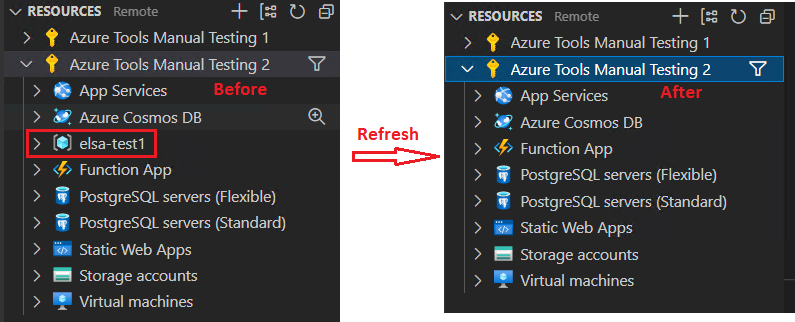
- There is a created resource group under the subscription view -> Refresh.
- Check whether the created resource group still shows from the subscription view.
Expect:
The created resource group still shows from the subscription view.
Actual:
The created resource group disappears from the subscription view.
Contributor guide
No contributing guide indexed for this repository
First steps
- Read the whole issue, then the project's contributing guide.
- Comment on the issue to say you are picking it up — it saves two people doing the same work.
- Fork the repository and make your change on a branch.
- Open a pull request that references the issue number.
Research direction
Reproduce the issue using the listed Azure: Create Resource Group steps, then refresh the subscription view and compare it with the expected result. Trace the resource-group refresh path in the VS Code Azure Resource Groups extension; done means the newly created group remains visible after refreshing.
Written by the indexing model from the issue text.
Assessment
- Tech stack
- azure, typescript
- Domain
- cloud
- Issue type
- Bug
- Difficulty
- 3/5
- Estimated time
- 1-2 days
- Activity status
- Stale
- Clarity
- Clearly specified
- Newbie friendliness
- 48/100