microsoft / microsoft/vscode-azurefunctions
[GitHub Codespaces] The breakpoint is not hit when debugging a Java project
Open
Nobody has claimed this yet.
AT-CTI
- Dominant language
- TypeScript
- Stars
- 319
- Forks
- 158
- Avg merge
- 2d 13h
- Merged PRs (30d)
- 4
Description
Environment: GitHub Codespaces (Remote)
Build Version: 20230302.1
Repro Steps:
- Create a new Java project and create a HttpTrigger template.
- Set a breakpoint in HttpTrigger.java file and debug this project.
- Navigate to workspace view and execute "Execute Function Now..." action for HttpTrigger function.
- Check whether the breakpoint is hit or not.
Expect:
The breakpoint is hit.
Actual:
The breakpoint is not hit.
More Info:
- This issue doesn't reproduce on non-Codespaces environment.
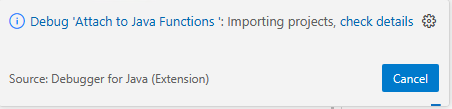
- A notification keeps showing when debugging the Java project.
Contributor guide
No contributing guide indexed for this repository
First steps
- Read the whole issue, then the project's contributing guide.
- Comment on the issue to say you are picking it up — it saves two people doing the same work.
- Fork the repository and make your change on a branch.
- Open a pull request that references the issue number.
Research direction
Reproduce the issue in GitHub Codespaces using a Java HttpTrigger project, following the listed steps and breakpoint in HttpTrigger.java. Start by observing the Execute Function Now... action and the persistent debugging notification; done means the breakpoint is hit in Codespaces as it is outside Codespaces.
Written by the indexing model from the issue text.
Assessment
- Tech stack
- azure, java, typescript, vscode
- Domain
- backend, cloud, devtools
- Issue type
- Bug
- Difficulty
- 4/5
- Estimated time
- 3-5 days
- Activity status
- Stale
- Clarity
- Mostly clear
- Newbie friendliness
- 35/100