microsoft / microsoft/vscode-azurefunctions
The function is still enabled after executing "Disable Function" action for a function of Python (New Model Preview) project
Open
@philliphoff is already working on this.
Since Aug 25, 2022.
AT-CTI
bug
investigate
- Dominant language
- TypeScript
- Stars
- 319
- Forks
- 158
- Avg merge
- 2d 13h
- Merged PRs (30d)
- 4
Description
OS: Win 10/Ubuntu 22.04
Build Version: 20220819.8
Repro Steps:
- Create and open a Python (New Model Preview) project.
- Uncomment the commented code block in function_app.py.
- Add a new function "TimeTrigger" append to function_app.py.
- Debug this project.
- Navigate to Azure view -> Expand the Functions node of "Workspace view" -> Right click one function and execute "Disable Function" for it.
- Check whether the function is disabled status or not.
Expect:
The function is disabled status.
Actual:
The function is still enabled status.

More Info:
- Refreshing the local workspace view can't fix this issue, restarting VS Code can fix this issue.
- The notification shows "Disabled function..." after executing "Disable Function".
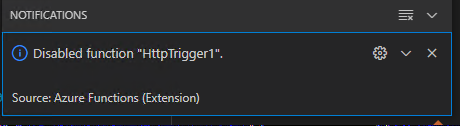
- This issue does not reproduce when debugging a normal Python project.
Contributor guide
No contributing guide indexed for this repository
First steps
- Read the whole issue, then the project's contributing guide.
- Comment on the issue to say you are picking it up — it saves two people doing the same work.
- Fork the repository and make your change on a branch.
- Open a pull request that references the issue number.
Assessment
This issue has not been assessed yet.