microsoft / microsoft/vscode-azurecontainerapps
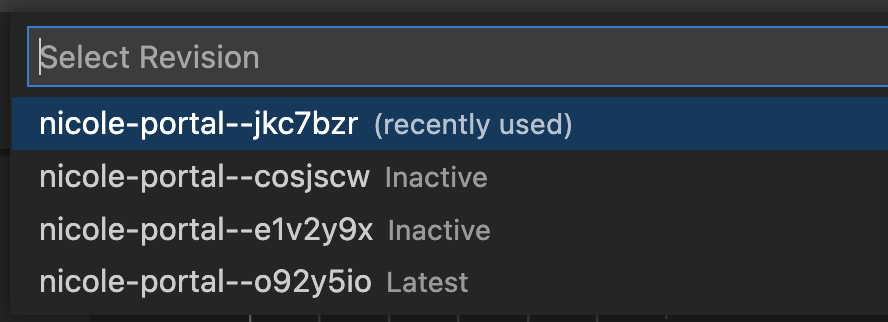
[Suggestion] It would be better to add revisions in the list when executing "Azure Container Apps: Activate Revision/Deactivate Revision/Restart Revision" command from command palette
Nobody has claimed this yet.
- Dominant language
- TypeScript
- Stars
- 42
- Forks
- 21
- Avg merge
- 3d 7h
- Merged PRs (30d)
- 2
Description
OS: All
Build Version: 20220908.8
Repro Steps:
- Right click a container app -> Click "Choose Revision Model..." -> Select "Multiple".
- F1 -> Azure Container Apps: Activate Revision -> Select a subscription -> Select a container app environment -> Select the above container app.
- Check whether the revisions show in the list.
Actual:
- The revisions don't show in the list.
- Execute command "Azure Container Apps: Activate Revision" directly.
Suggestion:
It would be better to add revisions in the list when executing "Azure Container Apps: Activate Revision/Deactivate Revision/Restart Revision" command from command palette, like below:
Contributor guide
No contributing guide indexed for this repository
First steps
- Read the whole issue, then the project's contributing guide.
- Comment on the issue to say you are picking it up — it saves two people doing the same work.
- Fork the repository and make your change on a branch.
- Open a pull request that references the issue number.
Research direction
Start by reproducing the issue through the Azure Container Apps: Activate Revision, Deactivate Revision, and Restart Revision commands from the command palette after selecting Multiple revision mode. Trace the command flow after selecting the subscription, environment, and container app. Done means the available revisions appear in the list and each command can be executed against a selected revision.
Written by the indexing model from the issue text.
Assessment
- Tech stack
- azure, typescript, vscode
- Domain
- cloud, developer-experience
- Issue type
- Feature
- Difficulty
- 3/5
- Estimated time
- 1-2 days
- Activity status
- Stale
- Clarity
- Mostly clear
- Newbie friendliness
- 35/100