Semantics of @example unclear (VSCode disagrees)
Nobody has claimed this yet.
- Dominant language
- TypeScript
- Stars
- 5k
- Forks
- 162
- Avg merge
- 17h 24m
- Merged PRs (30d)
- 8
Description
Hi,
I'm just dipping my toe into TSDoc, so my apologies in advance if this discussion is out of place, or what I'm about to say is common knowledge. Having said that:
There seems to be disagreement about how @example blocks are supposed to be interpreted, specifically when using VSCode.
If I add an @example block to my doc comment, VSCode responds by nicely syntax-highlighting the following code block:

That's amazing, exactly what I want! However, TSDoc tries to parse the code inside the @example block as "regular" docstrings:

Looks like TSDoc wants me to fence the code block with code delimiters, which is not as nice:
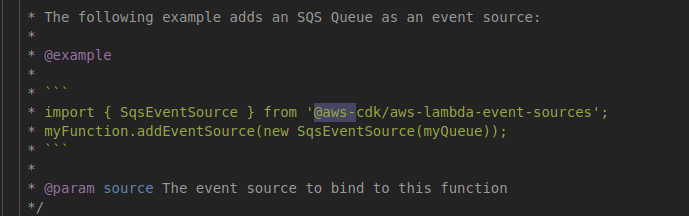
(Indentation by 4 spaces, which normally indicates literal code in MarkDown, doesn't work either, TSDoc still tries to parse the code)
Contributor guide
No contributing guide indexed for this repository
First steps
- Read the whole issue, then the project's contributing guide.
- Comment on the issue to say you are picking it up — it saves two people doing the same work.
- Fork the repository and make your change on a branch.
- Open a pull request that references the issue number.
Research direction
Start by reviewing the TSDoc @example semantics and comparing them with the VSCode behavior described in the issue, including fenced and indented code. Done means reaching and documenting a clear decision about how @example code should be interpreted and whether fencing is required.
Written by the indexing model from the issue text.
Assessment
- Tech stack
- typescript
- Domain
- documentation
- Issue type
- Documentation
- Difficulty
- 5/5
- Estimated time
- Over a week
- Activity status
- Stale
- Clarity
- Mostly clear
- Newbie friendliness
- 35/100