microsoft / microsoft/terminal
Fix "blurry" new tab icon on 100% DPI
Nobody has claimed this yet.
- Dominant language
- C++
- Stars
- 105k
- Forks
- 9.6k
- Avg merge
- 3d 17h
- Merged PRs (30d)
- 29
Description
Description of the new feature/enhancement
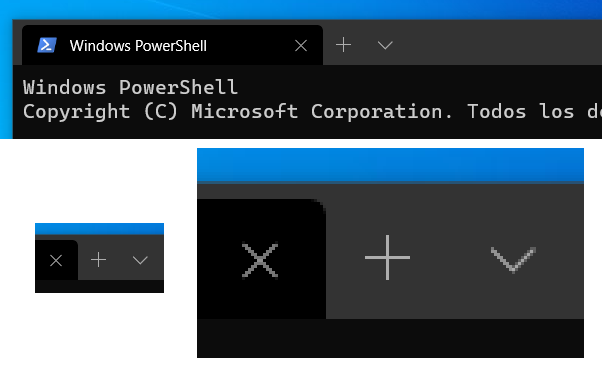
This is a little graphic detail that I noticed long ago. The "new tab" icon in Windows Terminal (1.1.2021.0) with 100% DPI scaling level is somewhat "blurry" or "thick", in comparison of other "new tab" icons like Microsoft Edge.
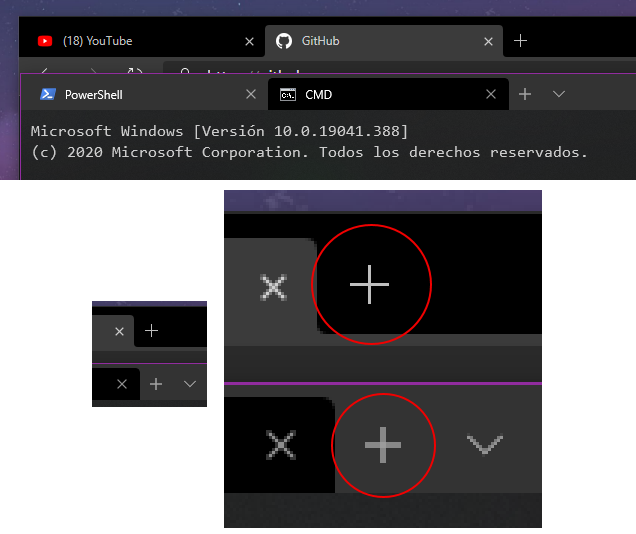
This graphic detail does not occur when the DPI scaling is at 125%.
Proposed technical implementation details (optional)
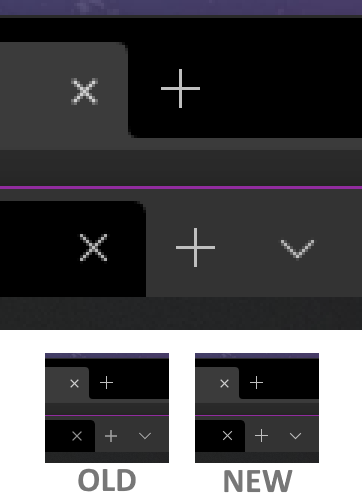
Update the "new tab" icon to a more "cleaner" version when DPI scaling is at 100%. An example:
Contributor guide
First steps
- Read the whole issue, then the project's contributing guide.
- Comment on the issue to say you are picking it up — it saves two people doing the same work.
- Fork the repository and make your change on a branch.
- Open a pull request that references the issue number.
Research direction
No files, tests, or entry points are named. First reproduce the new tab icon at 100% DPI and compare it with the 125% rendering and the provided reference images; done means the icon appears clean rather than blurry or thick at 100% DPI.
Written by the indexing model from the issue text.
Assessment
- Tech stack
- cpp
- Domain
- design, desktop
- Issue type
- Bug
- Difficulty
- 3/5
- Estimated time
- 1-2 days
- Activity status
- Stale
- Clarity
- Mostly clear
- Newbie friendliness
- 35/100