microsoft / microsoft/terminal
Add keybinding command to kill current process
Nobody has claimed this yet.
- Dominant language
- C++
- Stars
- 105k
- Forks
- 9.6k
- Avg merge
- 3d 17h
- Merged PRs (30d)
- 29
Description
Description of the new feature/enhancement
I'm copying this feature from ConEmu.
In Python development on Windows, if you run an asyncio loop then Python can't be stopped using regular KeyboardInterrupt Exception. This leaves me forced to have to close the current tab and open new one. In ConEmu this is resolved by the ability to bind keys combination to command that results in killing current PID, like:
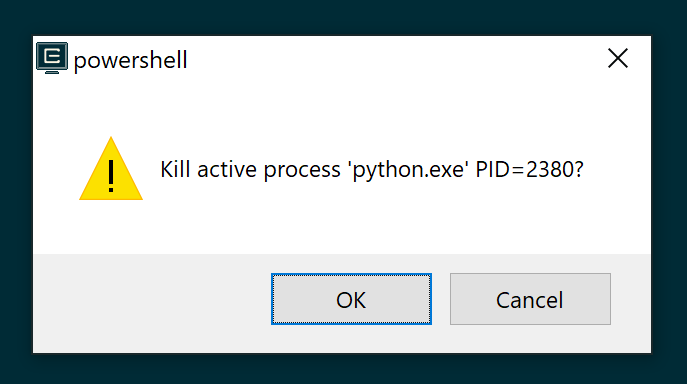
Proposed technical implementation details (optional)
Terminal should be able to detect current running process in the current tab and gets its PID and offer the user the ability to force stop it using low-level Windows commands. Resulting in the process running to be killed, but the shell used to start the process kept alive and back in focus for the user to continue using the current tab using the current shell.
Contributor guide
First steps
- Read the whole issue, then the project's contributing guide.
- Comment on the issue to say you are picking it up — it saves two people doing the same work.
- Fork the repository and make your change on a branch.
- Open a pull request that references the issue number.
Research direction
Start by tracing how key combinations are bound to commands and how the current tab identifies its running process and PID. Confirm the Windows low-level command needed to stop that process while leaving the shell alive and focused; done means the process is killed and the existing shell remains usable.
Written by the indexing model from the issue text.
Assessment
- Tech stack
- cpp
- Domain
- cli, operating-systems
- Issue type
- Feature
- Difficulty
- 4/5
- Estimated time
- 3-5 days
- Activity status
- Stale
- Clarity
- Mostly clear
- Newbie friendliness
- 35/100