microsoft / microsoft/terminal
Color schemes can get "stuck" when the Theme is Light
- Dominant language
- C++
- Stars
- 105k
- Forks
- 9.6k
- Avg merge
- 3d 17h
- Merged PRs (30d)
- 29
Description
### Windows Terminal version
Commit 97a617a909f1dd3664daf3a1764c9a7e8996a1b8
### Windows build number
10.0.19045.2728
### Other Software
_No response_
### Steps to reproduce
1. In Windows Terminal open the _Settings_ page.
2. Set the _Theme_ to _Light_.
3. Go to any profile and change the color scheme to something obviously different from the default, e.g. _One Half Light_.
4. Go to the default profile and also change that color scheme to _One Half Light_.
5. Go back to the profile from step 3 and reset the color scheme to the inherited value.
6. Go to the default profile and reset the color scheme there too.
7. Save the settings.
8. Go back to the profile from step 3 and view the appearance.
### Expected Behavior
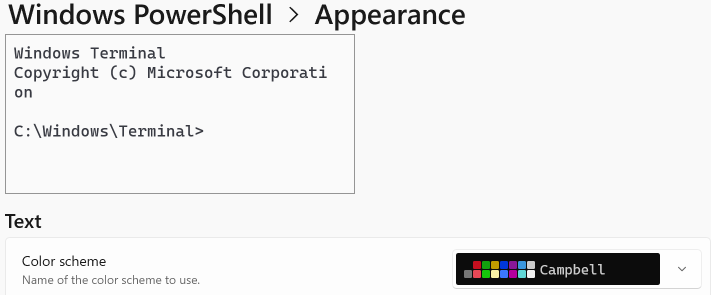
Everything should now have been reset to the default color scheme, i.e. _Campbell_.
### Actual Behavior
The color scheme is listed as being _Campbell_, but what is displayed in the preview window is still _One Half Light_, and that's also what gets used if you try and start that profile.
Contributor guide
Research direction
Reproduce the issue in Windows Terminal by following the listed Settings and profile color-scheme steps, using the Light theme and Campbell as the expected default. Trace how resetting inherited schemes updates the preview and the launched profile; done means both display and use Campbell after saving and reopening the profile.
Written by the indexing model from the issue text.
Assessment
- Tech stack
- cpp
- Domain
- desktop
- Issue type
- Bug
- Difficulty
- 3/5
- Estimated time
- 1-2 days
- Activity status
- Stale
- Clarity
- Mostly clear
- Newbie friendliness
- 45/100