microsoft / microsoft/terminal
Our MinMaxCloseControl's resources are all messed up
Nobody has claimed this yet.
- Dominant language
- C++
- Stars
- 105k
- Forks
- 9.6k
- Avg merge
- 3d 17h
- Merged PRs (30d)
- 29
Description
### Windows Terminal version
1.16.10262.0
### Windows build number
10.0.22621.0
### Other Software
_No response_
### Steps to reproduce
Hover the center of the windows' close button.
### Expected Behavior
A tooltip should appear in the local language's equivalent of "Close".
### Actual Behavior
Hovering the button shows two tooltips fade in, first the English one, then the local language's one.
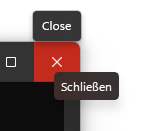
https://user-images.githubusercontent.com/24683548/222845299-ac3d37c1-e5fb-4a34-997a-f71d086ca9cd.mp4
Contributor guide
First steps
- Read the whole issue, then the project's contributing guide.
- Comment on the issue to say you are picking it up — it saves two people doing the same work.
- Fork the repository and make your change on a branch.
- Open a pull request that references the issue number.
Research direction
Start by reproducing the duplicate tooltip when hovering the center of the Windows Terminal close button, then inspect the MinMaxCloseControl resources involved in that hover state. Done means hovering the button shows only one tooltip, using the equivalent of “Close” in the local language.
Written by the indexing model from the issue text.
Assessment
- Tech stack
- cpp
- Domain
- desktop
- Issue type
- Bug
- Difficulty
- 3/5
- Estimated time
- 1-2 days
- Activity status
- Stale
- Clarity
- Mostly clear
- Newbie friendliness
- 35/100