microsoft / microsoft/terminal
Command Palette background color doesn't update correctly when toggling with keyboard
Nobody has claimed this yet.
- Dominant language
- C++
- Stars
- 105k
- Forks
- 9.6k
- Avg merge
- 3d 17h
- Merged PRs (30d)
- 29
Description
### Windows Terminal version
1.13.11432.0
### Windows build number
10.0.25136.0
### Other Software
_No response_
### Steps to reproduce
1. `Ctrl+Shift+P` to open command palette
2. type `color` to select color scheme
3. toggle color schemes using up/down keys
4. the command palette background color doesn't update accordingly (scroll on the mouse scrollwheel seems to force it to update and you can see the difference)
### Expected Behavior
_No response_
### Actual Behavior
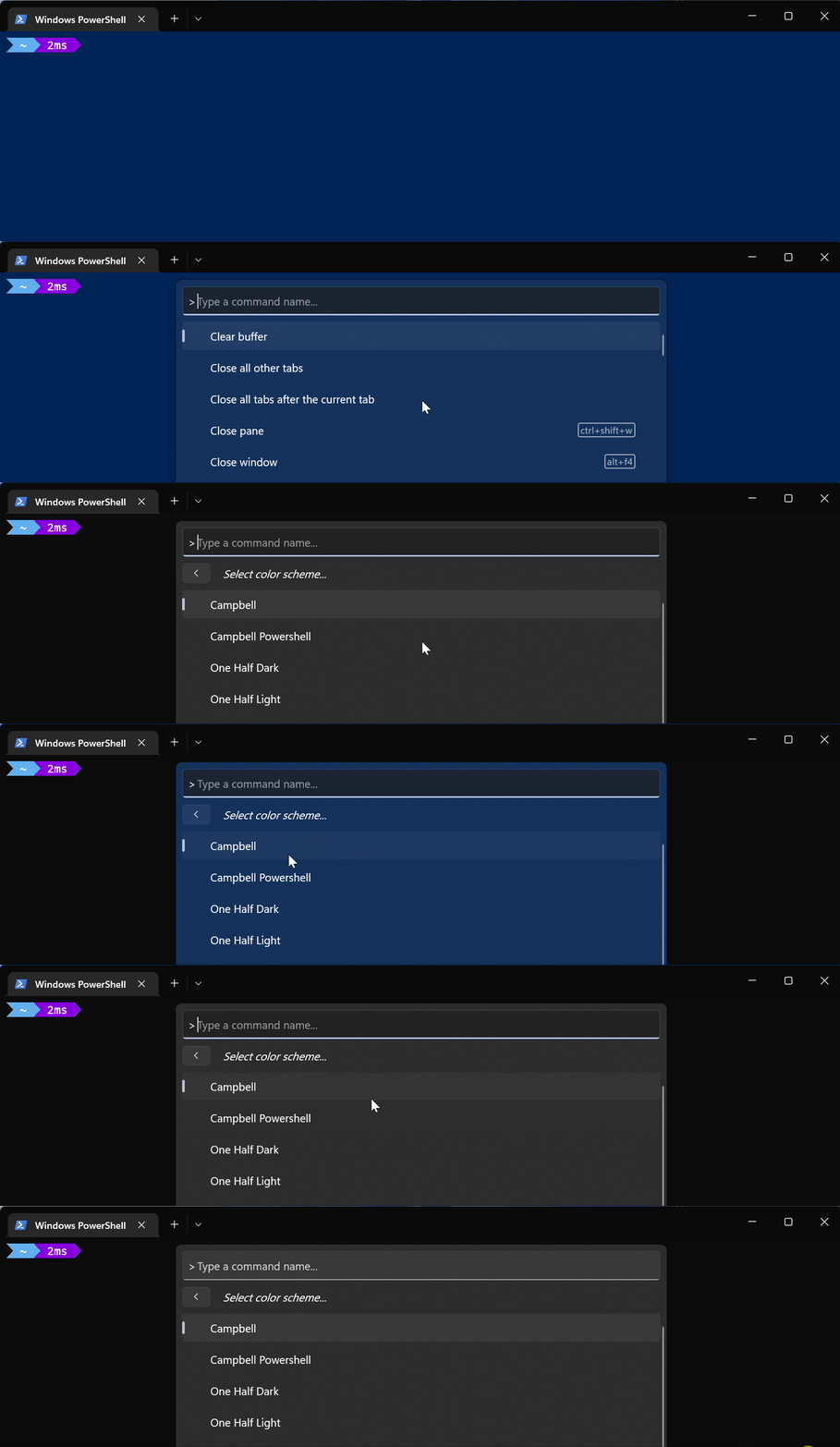
Contributor guide
First steps
- Read the whole issue, then the project's contributing guide.
- Comment on the issue to say you are picking it up — it saves two people doing the same work.
- Fork the repository and make your change on a branch.
- Open a pull request that references the issue number.
Research direction
Reproduce the issue in Windows Terminal 1.13.11432.0 on Windows build 10.0.25136.0 by opening the command palette with Ctrl+Shift+P, selecting the color scheme command, and toggling with the up/down keys. Compare the keyboard behavior with mouse-wheel scrolling; done when the command palette background updates for every keyboard toggle without requiring a scroll.
Written by the indexing model from the issue text.
Assessment
- Tech stack
- cpp
- Domain
- desktop
- Issue type
- Bug
- Difficulty
- 3/5
- Estimated time
- 1-2 days
- Activity status
- Stale
- Clarity
- Mostly clear
- Newbie friendliness
- 42/100