microsoft / microsoft/terminal
Rewriting last console output line dynamically breaks when resizing window
Nobody has claimed this yet.
- Dominant language
- C++
- Stars
- 105k
- Forks
- 9.6k
- Avg merge
- 3d 17h
- Merged PRs (30d)
- 29
Description
### Windows Terminal version (or Windows build number)
Windows Terminal Preview Version: 1.9.1523.0
### Other Software
- DISM.exe
- Example code that outputs to the console:
```
public class ClearConsoleOutput {
public static void main(String[] args) throws Exception {
// text to output to the console
String text = "Hello World ";
for(int i=0; i<10000; i++) {
// prints String = "[text][i]" and places the cursor on the line below String
System.out.println(text + i);
// Pause execution of the code below so that the text is visible for 10ms
Thread.sleep(10);
// [count] = [lines_printed_to_console] + [new_lines_created_after_output] - 1
int count = 1;
// Erase only the lines printed to the console
System.out.print(String.format("\033[%dA",count)); // Move up [count] lines
System.out.print("\033[2K"); // Erase line content
// OR Erase all content printed to the console
//System.out.print(String.format("\033[2J")); // Erase all content
}
}
}
```
### Steps to reproduce
> Disclaimer: if you run DISM.exe do not close the console until the process finishes.
>
> ELSE compile and run ClearConsoleOutput java class above using:
>
> * `javac --release 8 ClearConsoleOutput.java`
> * `java ClearConsoleOutput`
>
> in Windows Terminal application running an instance of PowerShell or cmd
Run DISM command or ClearConsoleOutput class above in Windows Terminal application (PowerShell or cmd) , and when text is being written to the console, resize Windows Terminal window by dragging from one of the edges. Pressing `Ctrl + Scroll_Wheel_Up/Down` or `Ctrl + '+'/'-'` produces a similar result.
*The terminal needs to be resized such that while text is printed, the window height is smaller than the content height.* The pictures below show the result after the window has been resized to a normal viewing mode.
### Expected Behavior
#### For DISM.exe
The "`[==== {x}% ====]`" progress bar should appear only once, as last line in the terminal, being updated as needed by the process it is attached to.
#### For ClearConsoleOutput class
The string "`Hello World {x}`" should be visible as a single line of text when being updated once every 10 milliseconds.
### Actual Behavior
#### In both cases
The line containing the updating text should appear only once and display exactly the information it needs to provide, even if it I decide in the exact moment the command/program is running to resize the window dimensions or increase/decrease the font size. Below are the results of running DISM.exe and ClearConsoleOutput class after the window was returned to its regular size.

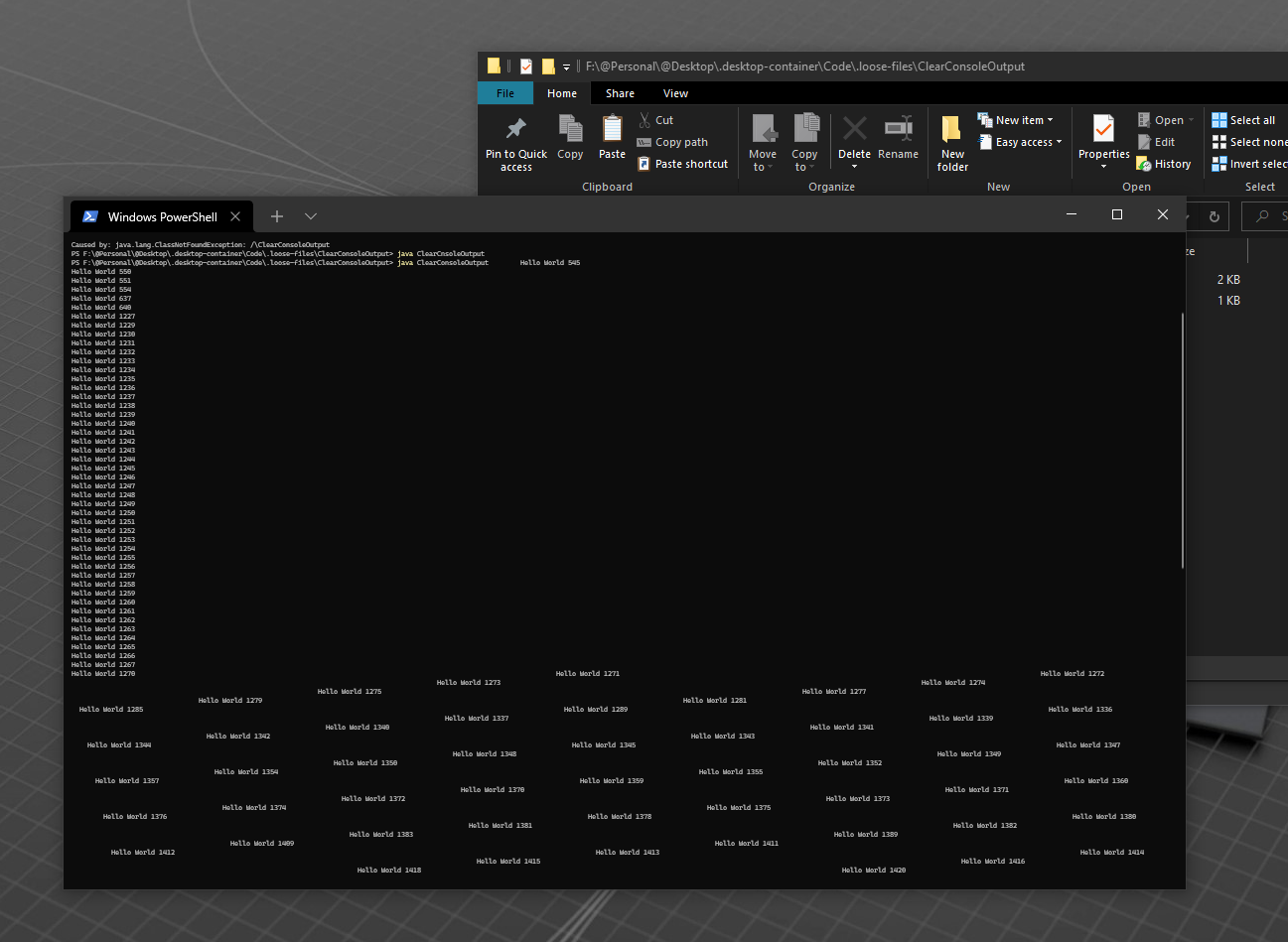
#### Conclusion:
Depending on the way the window is being resized, the output can appear: concatenated, incomplete, on separate lines, multiple times on the same line, even in the wrong order.
As seen in the updated version below, which includes a timestamp for each statement printed, the expected output is one continuously updating line counting from 0 to 9999, but the actual output is unreadable.
#### Desired behavior:

Contributor guide
First steps
- Read the whole issue, then the project's contributing guide.
- Comment on the issue to say you are picking it up — it saves two people doing the same work.
- Fork the repository and make your change on a branch.
- Open a pull request that references the issue number.
Research direction
Start by reproducing the behavior with DISM.exe or the provided ClearConsoleOutput Java class in Windows Terminal, then resize the window while output is updating. Compare the resulting terminal output with the expected single dynamically updated line; done means resizing or changing font size no longer duplicates, fragments, reorders, or concatenates that output.
Written by the indexing model from the issue text.
Assessment
- Tech stack
- cpp
- Domain
- cli, operating-systems
- Issue type
- Bug
- Difficulty
- 4/5
- Estimated time
- 3-5 days
- Activity status
- Stale
- Clarity
- Mostly clear
- Newbie friendliness
- 35/100