microsoft / microsoft/terminal
Combine Fonts, Appearance and Color Schemes into "appearances"
- Dominant language
- C++
- Stars
- 105k
- Forks
- 9.6k
- Avg merge
- 3d 17h
- Merged PRs (30d)
- 29
Description
# Description of the new feature/enhancement
I like making and switching between "themes" - I would define a theme as a combination of:
* Font size, face
* Cursor shape
* Background image, acrylic
* Antialiasing setting
* Retro terminal effects on/off
* Colour scheme
Example:
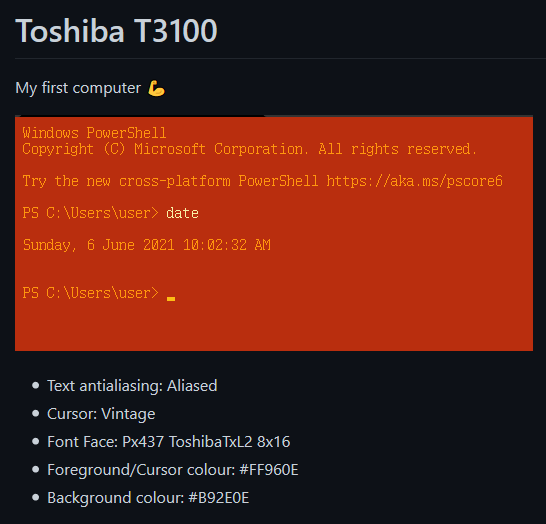
More examples on my github here:
https://github.com/campbellkerr/WindowsTerminalThemes
Currently, when changing "themes", I have to adjust all of these settings individually through the GUI - adjusting the .json is not any faster.
# Proposed technical implementation details (optional)
Some thoughts:
* Have a Theme section, each theme has a name and you can combine a colour scheme (already setup in the Colour Schemes section) and fonts, font settings, cursor shape etc
* Even better - combine appearance/advanced and Colour Schemes into a Themes area, then for each profile, you simply choose a theme instead of going through numerous settings
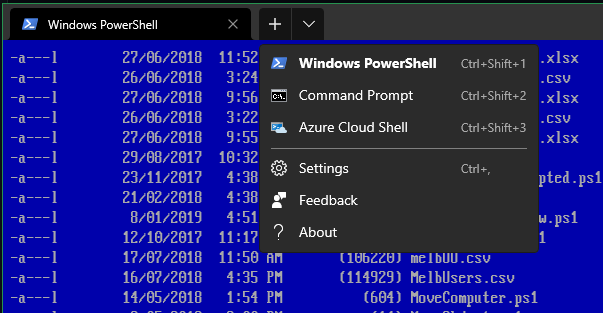
* Include a theme switcher/selector in the drop down menu so you can switch themes without diving into settings here:
Thanks!
Contributor guide
Research direction
Start by reviewing the existing Appearance/Advanced and Color Schemes settings in the Windows Terminal GUI and their JSON representation. Compare the requested theme combinations and dropdown selector with the current behavior, then define the affected settings and interaction scope; done means the design and implementation requirements for named, switchable appearances are agreed.
Written by the indexing model from the issue text.
Assessment
- Tech stack
- cpp
- Domain
- cli, desktop
- Issue type
- Feature
- Difficulty
- 5/5
- Estimated time
- Over a week
- Activity status
- Stale
- Clarity
- Needs clarification
- Newbie friendliness
- 30/100