microsoft / microsoft/terminal
Retro Terminal Effect looks bad with 125% screen scaling
- Dominant language
- C++
- Stars
- 105k
- Forks
- 9.6k
- Avg merge
- 3d 17h
- Merged PRs (30d)
- 29
Description
### Windows Terminal version (or Windows build number)
1.7.1033.0
### Other Software
_No response_
### Steps to reproduce
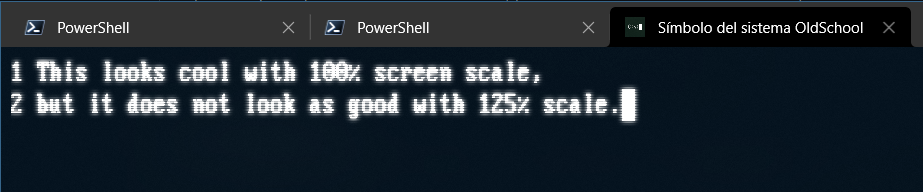
The Retro Terminal Effect looks very nice with 100% screen scaling (selected in Windows Screen settings), but looks a little bit off when screen scaling is set to 125% (which is the default on my 1920*1080 laptop screen). With 100% screen scaling, the "scan lines" look evenly distributed, but they do not with 125% scaling. I'm attaching screenshots with both scaling factors in the "Expected behavior" and "Actual behavior" sections for comparison.
### Expected Behavior
The expected behavior would be evenly distributed scan lines at any screen scaling setting, as seen on this screenshot at 100% scaling:

### Actual Behavior
The scan lines look uneven at 125% screen scaling, as seen on this screenshot:
Contributor guide
Research direction
Start by reproducing the Retro Terminal Effect in Windows Terminal 1.7.1033.0 at 100% and 125% screen scaling, comparing the provided screenshots. Done means the scan lines are evenly distributed at both scaling settings; the issue does not mention a source file or test to inspect.
Written by the indexing model from the issue text.
Assessment
- Tech stack
- cpp
- Domain
- cli, desktop, operating-systems
- Issue type
- Bug
- Difficulty
- 3/5
- Estimated time
- 1-2 days
- Activity status
- Stale
- Clarity
- Mostly clear
- Newbie friendliness
- 35/100