microsoft / microsoft/sql-server-samples
Format File for Invoke-SqlAssessment of SQL Server Assessment APIs
Nobody has claimed this yet.
- Dominant language
- PowerShell
- Stars
- 11.2k
- Forks
- 9.1k
- Avg merge
- 2d 7h
- Merged PRs (30d)
- 14
Description
The cmdlet Get-SqlAssessment has a format file associated with it (I can't find it in SQLProvider.Format.ps1xml but it is getting formatted).

It's a great help showing only the information that is needed at a glance and saving the extra information in case it'll be used down the pipeline, like Level, Tags, etc.
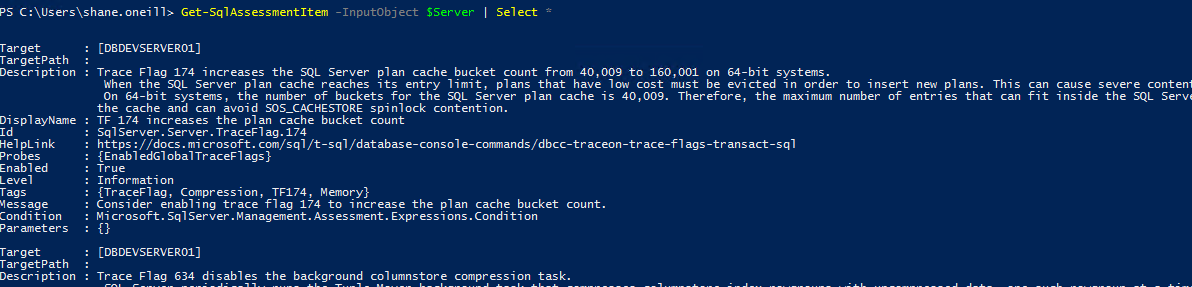
Invoke-SqlAssessment
Invoke-SqlAssessment does not have a format file and I'd argue that it would require one.
The expectation would be that the results of the Invoke-SqlAssessment would be looked at more than people would look at the results of Get-SqlAssessmentItem
Current View
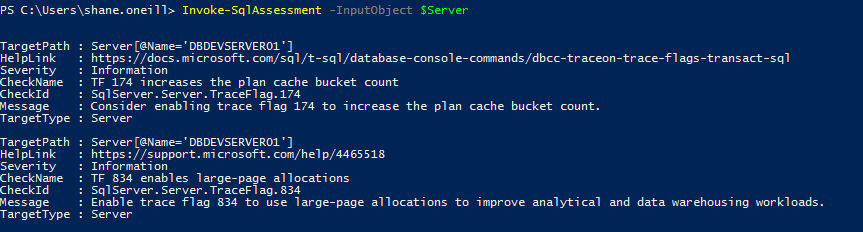
Currently the cmdlet returns :
Default
With Select *
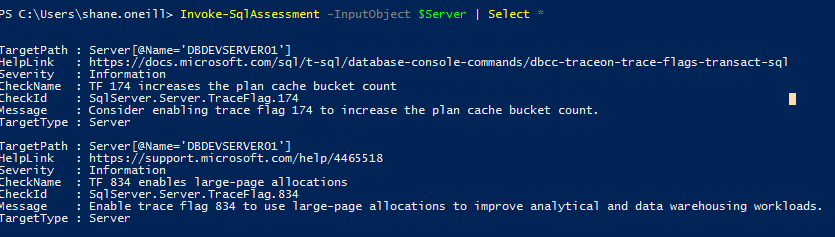
which are the exact same data.
However, I'd argue that the information required at a glance would be properties : CheckId, CheckName, Message, and (potentially) HelpLink.
Action
Can we include a format file for Invoke-SqlAssessment that returns the properties : CheckId, CheckName, Message, and (potentially) HelpLink?

Contributor guide
No contributing guide indexed for this repository
First steps
- Read the whole issue, then the project's contributing guide.
- Comment on the issue to say you are picking it up — it saves two people doing the same work.
- Fork the repository and make your change on a branch.
- Open a pull request that references the issue number.
Research direction
Start by inspecting the existing SQLProvider.Format.ps1xml formatting definitions and the output object from Invoke-SqlAssessment. Add a format definition showing CheckId, CheckName, Message, and potentially HelpLink, then verify that the default cmdlet view presents those properties while retaining the other data for pipeline use.
Written by the indexing model from the issue text.
Assessment
- Tech stack
- powershell, sql
- Domain
- databases, tooling
- Issue type
- Feature
- Difficulty
- 2/5
- Estimated time
- 1-3 hours
- Activity status
- Stale
- Clarity
- Mostly clear
- Newbie friendliness
- 35/100