microsoft / microsoft/react-native-windows
Crash when unsetting the component name in ReactRootView
Nobody has claimed this yet.
- Dominant language
- C++
- Stars
- 17.3k
- Forks
- 1.2k
- Avg merge
- 1d 13h
- Merged PRs (30d)
- 33
Description
While looking at the implementation of ReactRootView, I noticed that each of the following statements call ReloadView(), potentially creating and throwing away views.
    ReactRootView().ComponentName(name);
    ReactRootView().InitialProps(initialProps);
In an attempt to eliminate wasted reloads when setting a new component and/or initial props, I've found that if I first unset the component name, I can prevent ReloadView() from creating a new React view until the last statement:
    ReactRootView().ComponentName({});
    ReactRootView().InitialProps(initialProps);
    ReactRootView().ComponentName(name);
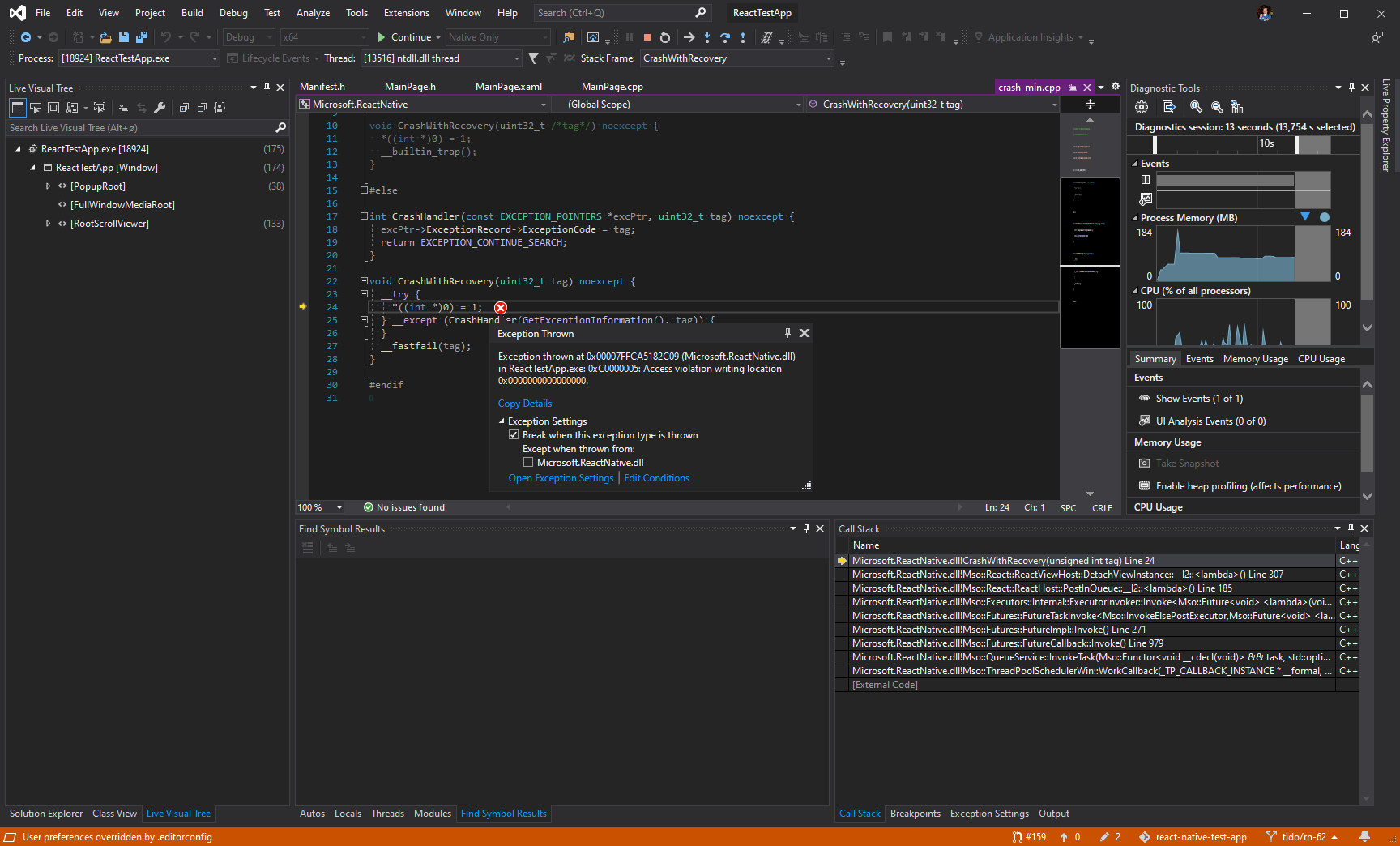
However, this crashes the app:
>   Microsoft.ReactNative.dll!Mso::React::ReactViewHost::DetachViewInstance::__l2::<lambda>() Line 307    C++
    Microsoft.ReactNative.dll!Mso::React::ReactHost::PostInQueue::__l2::<lambda>() Line 185    C++
    Microsoft.ReactNative.dll!Mso::Executors::Internal::ExecutorInvoker::Invoke<Mso::Future<void> <lambda>(void) &>(Mso::React::ReactHost::PostInQueue::__l2::Mso::Future<void> <lambda>(void) & callback) Line 203    C++
    Microsoft.ReactNative.dll!Mso::Futures::FutureTaskInvoke<Mso::InvokeElsePostExecutor,Mso::Future<void> <lambda>(void),void,Mso::Future<void>,4>::Invoke(const Mso::Async::ArrayView<unsigned char> & taskBuffer, Mso::Futures::IFuture * future, Mso::Futures::IFuture * __formal) Line 317    C++
    Microsoft.ReactNative.dll!Mso::Futures::FutureImpl::Invoke() Line 271    C++
    Microsoft.ReactNative.dll!Mso::Futures::FutureCallback::Invoke() Line 979    C++
    Microsoft.ReactNative.dll!Mso::QueueService::InvokeTask(Mso::Functor<void __cdecl(void)> && task, std::optional<std::chrono::time_point<std::chrono::steady_clock,std::chrono::duration<__int64,std::ratio<1,1000000000>>>> endTime) Line 210    C++
    Microsoft.ReactNative.dll!Mso::ThreadPoolSchedulerWin::WorkCallback(_TP_CALLBACK_INSTANCE * __formal, void * context, _TP_WORK * __formal) Line 89    C++
If I simply comment out the first line, everything works fine.
Environment
npx react-native --version: 4.10.1npx react-native run-windows --info:System: OS: Windows 10 10.0.18362 CPU: (4) x64 Intel(R) Core(TM) i5-4690K CPU @ 3.50GHz Memory: 6.09 GB / 15.45 GB Binaries: Node: 12.18.3 - ~\scoop\apps\nodejs-lts\current\node.EXE Yarn: 1.22.4 - ~\scoop\apps\yarn\current\Yarn\bin\yarn.CMD npm: 6.14.6 - ~\source\repos\react-native-test-app\node_modules\.bin\npm.CMD npmPackages: @react-native-community/cli: ^4.5.1 => 4.10.1 react: 16.11.0 => 16.11.0 react-native: 0.62.2 => 0.62.2 react-native-windows: 0.62.2 => 0.62.2 Installed UWP SDKs: 10.0.18362.0reg query "HKLM\SOFTWARE\Microsoft\Windows\CurrentVersion\AppModelUnlock"HKEY_LOCAL_MACHINE\SOFTWARE\Microsoft\Windows\CurrentVersion\AppModelUnlock AllowDevelopmentWithoutDevLicense REG_DWORD 0x1 AllowAllTrustedApps REG_DWORD 0x1
- Target Platform Version(s): 10.0.18362
- Target Device(s): Desktop
- Visual Studio Version: Community 2019
- Build Configuration: Debug
Steps To Reproduce
- Modify any app to set component name in the following sequence:
void MainPage::LoadReactComponent(winrt::param::hstring name, winrt::Microsoft::ReactNative::JSValueArgWriter const& initialProps) { ReactRootView().ComponentName({}); ReactRootView().InitialProps(initialProps); ReactRootView().ComponentName(name); } - Call
LoadReactComponenttwice (the first one will succeed if there are no previous component set)
Expected Results
The app successfully creates a new React view with provided component name and initial props.
Snack, code example, screenshot, or link to a repository:
Repro can be found here: https://github.com/microsoft/react-native-test-app/commit/27149121b3c4690c4b26d780a2723ea44e23253c
- Run
yarnin project root - Run
yarnin/example - Run
yarn start:windowsin/example - Open
/windows/ReactTestApp.sln
cc @chrisglein
Contributor guide
First steps
- Read the whole issue, then the project's contributing guide.
- Comment on the issue to say you are picking it up — it saves two people doing the same work.
- Fork the repository and make your change on a branch.
- Open a pull request that references the issue number.
Research direction
Start with ReactRootView and the LoadReactComponent sequence shown in the issue, then inspect the ReactViewHost::DetachViewInstance stack frame. Follow the react-native-test-app reproduction at commit 27149121b3c4690c4b26d780a2723ea44e23253c and run the listed Windows steps. Done means calling LoadReactComponent twice after clearing the component name creates the requested view without crashing.
Written by the indexing model from the issue text.
Assessment
- Tech stack
- cpp, react-native
- Domain
- desktop, frontend
- Issue type
- Bug
- Difficulty
- 4/5
- Estimated time
- 3-5 days
- Activity status
- Stale
- Clarity
- Mostly clear
- Newbie friendliness
- 35/100