microsoft / microsoft/react-native-windows
Picker's popup has a parallax effect
Nobody has claimed this yet.
- Dominant language
- C++
- Stars
- 17.3k
- Forks
- 1.2k
- Avg merge
- 1d 13h
- Merged PRs (30d)
- 33
Description
Environment
react-native -v:
react-native-cli: 2.0.1
react-native: 0.60.6npm ls rnpm-plugin-windows:
rnpm-plugin-windows@0.3.5npm ls react-native-windows:
react-native-windows@0.60.0-vnext.91node -v:
v10.15.0npm -v:
6.13.1
Then, specify:
- Target Platform Version(s): 10.0.18362.0
- Target Device(s): Desktop
- Visual Studio Version: 2017
- Build Configuration: Debug
Steps to Reproduce
- Create a Picker
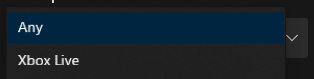
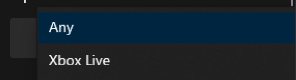
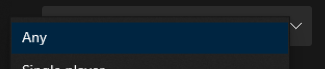
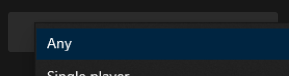
- Observe that the picker's popup changes based on its position in the window:
- If the Picker is in the top-left corner of the app window, the popup will be up and to the left
- If the Picker is in the top-right corner of the app window, the popup will be up and to the right
- If the Picker is in the bottom-left corner of the app window, the popup will be down and to the left
- If the Picker is in the bottom-right corner of the app window, the popup will be down and to the right
Example code:
import * as RN from "react-native";

render() {
    return (
          <RN.Picker>
               <Picker.Item label="Any" value="Any" />
          </RN.Picker>
     );
}
Expected Behavior
I expected the popup to appear directly on top of the Picker regardless of the Picker's position in the app window.
Actual Behavior
The popup does not appear directly on top of the Picker depending on the Picker's position in the app window:
- If the Picker is in the top-left corner of the app window, the popup will be up and to the left
- If the Picker is in the top-right corner of the app window, the popup will be up and to the right
- If the Picker is in the bottom-left corner of the app window, the popup will be down and to the left
- If the Picker is in the bottom-right corner of the app window, the popup will be down and to the right
Screenshots
Top left:
Top right:
Bottom left:
Bottom right:
If this parallax effect is expected behavior, is there a way to disable it?
Contributor guide
First steps
- Read the whole issue, then the project's contributing guide.
- Comment on the issue to say you are picking it up — it saves two people doing the same work.
- Fork the repository and make your change on a branch.
- Open a pull request that references the issue number.
Research direction
Reproduce the issue with the provided Picker example on React Native Windows using the stated environment and desktop target. Start from the Picker entry point and trace how the popup position is determined; the report names no source file or test. Done means the popup appears directly over the Picker regardless of its window position, with coverage added if an appropriate test location is found.
Written by the indexing model from the issue text.
Assessment
- Tech stack
- cpp, react-native
- Domain
- desktop, frontend
- Issue type
- Bug
- Difficulty
- 3/5
- Estimated time
- 1-2 days
- Activity status
- Stale
- Clarity
- Clearly specified
- Newbie friendliness
- 35/100