Sometimes shadow blocks are black
Open
Nobody has claimed this yet.
blocks editor
- Dominant language
- TypeScript
- Stars
- 2.3k
- Forks
- 641
- Avg merge
- 12h 4m
- Merged PRs (30d)
- 57
Description
Sometimes I see that shadow blocks are black when you create new blocks on the workspace.
If you click on them to open the drop-down menu, or expand the block, then it assumes the right color.
This is pretty reproducible with the Game Over block in Arcade:
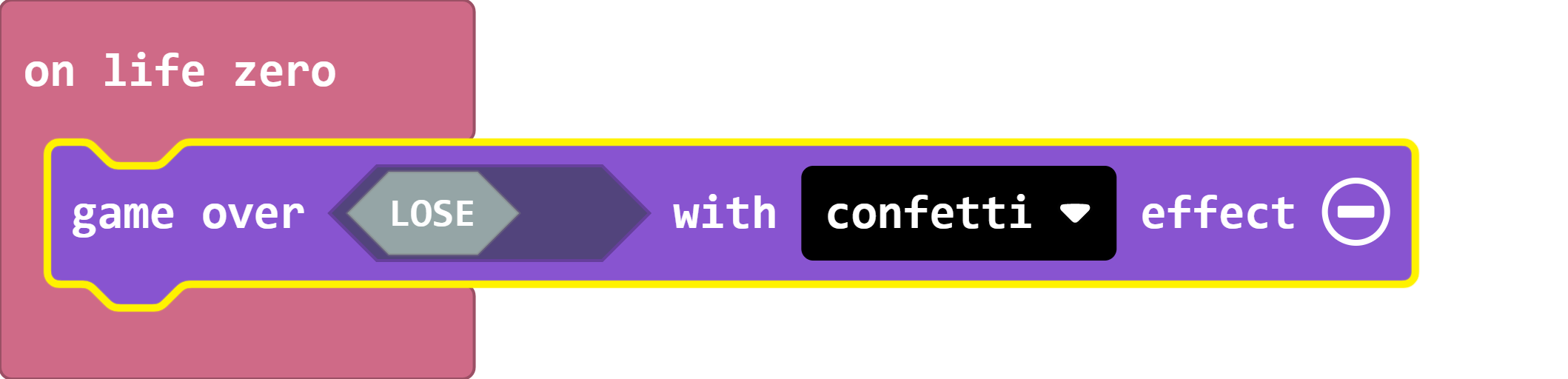
Blockly bug?
Contributor guide
First steps
- Read the whole issue, then the project's contributing guide.
- Comment on the issue to say you are picking it up — it saves two people doing the same work.
- Fork the repository and make your change on a branch.
- Open a pull request that references the issue number.
Research direction
Reproduce the issue in the Arcade workspace using the Game Over block and observe newly created shadow blocks before opening or expanding them. Trace the block rendering and color initialization from that reproduction; done means shadow blocks show their intended color immediately without user interaction.
Written by the indexing model from the issue text.
Assessment
- Tech stack
- typescript
- Domain
- frontend
- Issue type
- Bug
- Difficulty
- 3/5
- Estimated time
- 1-2 days
- Activity status
- Stale
- Clarity
- Mostly clear
- Newbie friendliness
- 35/100