microsoft / microsoft/pxt-microbit
Extension icons are clipped - seeking clarification on required icon size
Nobody has claimed this yet.
- Dominant language
- TypeScript
- Stars
- 804
- Forks
- 721
- Avg merge
- 2d 9h
- Merged PRs (30d)
- 2
Description
Describe the bug
On the extensions dialogue, and especially on the gallery page (https://makecode.microbit.org/extensions), lots of icons are clipped so that important parts of the design are missing.
MakeCode extension icons are specified to be 300x200 pixels and less than 100kb in size (https://makecode.microbit.org/extensions/approval), though few existing extension icons fit that spec.
The spaces available on the extensions dialogue and the extensions gallery appear to have aspect ratios of about 1.63 and 1.95, not 1.5, which means a 300x200 icon will be clipped top and bottom to about 300x184 and 300x155.
To Reproduce
Visit the extensions dialogue or the gallery.
Expected behavior
Extensions icons are the specified size, and not clipped if they are.
Screenshots
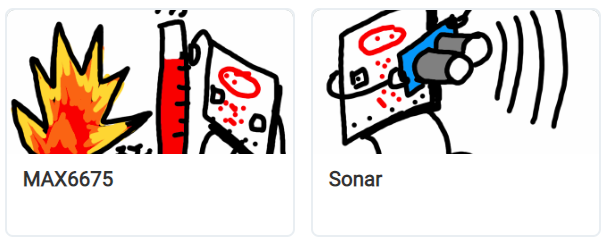
micro:bit version (please complete the following information):
not hardware related
Desktop (please complete the following information):
- OS: [e.g. iOS] Windows
- Browser [e.g. chrome, safari] Chrome
- Version [e.g. 22] 105
Contributor guide
First steps
- Read the whole issue, then the project's contributing guide.
- Comment on the issue to say you are picking it up — it saves two people doing the same work.
- Fork the repository and make your change on a branch.
- Open a pull request that references the issue number.
Research direction
Start by comparing icon rendering in the extensions dialogue and the extensions gallery at the URLs described in the issue, using the stated 300x200 specification and the observed container aspect ratios. Confirm which sizing behavior is intended with the maintainers, then verify that compliant extension icons display without important content being clipped in both locations.
Written by the indexing model from the issue text.
Assessment
- Tech stack
- typescript
- Domain
- frontend
- Issue type
- Bug
- Difficulty
- 3/5
- Estimated time
- 1-2 days
- Activity status
- Stale
- Clarity
- Mostly clear
- Newbie friendliness
- 35/100