microsoft / microsoft/pxt-microbit
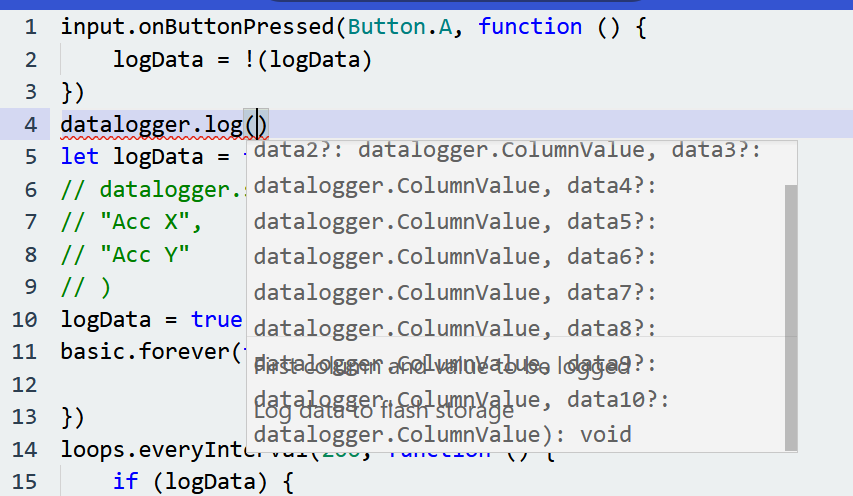
JavaScript Data Logger Tooltip Shows Garbled Text
Nobody has claimed this yet.
- Dominant language
- TypeScript
- Stars
- 804
- Forks
- 721
- Avg merge
- 2d 9h
- Merged PRs (30d)
- 2
Description
Describe the bug
The tooltip that is produced for the data logger's log function has text that is writing over itself.
To Reproduce
Steps to reproduce the behavior:
- Open up a new project and click on the
Extensionsbutton - Download the data logger extension
- Switch the project to Javascript
- Type
datalogger.log(and notice the tooltip that pops up with the garbled text
Expected behavior
Tooltip should not have text written over other text
Screenshots
micro:bit version (please complete the following information):
4.1.51
You can find this information in the lower right hand corner of the back of micro:bit (the side that says BBC micro:bit).
Not hardware related
Desktop (please complete the following information):
- OS: Windows 11
- Browser Firefox, Edge
- Version 99.0.1 (64-bit), 101.0.1210.47 (Official build) (64-bit)
Contributor guide
First steps
- Read the whole issue, then the project's contributing guide.
- Comment on the issue to say you are picking it up — it saves two people doing the same work.
- Fork the repository and make your change on a branch.
- Open a pull request that references the issue number.
Research direction
Start by reproducing the issue through Extensions with the data logger enabled, switch to JavaScript, and enter datalogger.log(. Inspect the tooltip-generation path for the data logger's log function. Done means the tooltip text is readable without overlapping or garbling in the reported browsers.
Written by the indexing model from the issue text.
Assessment
- Tech stack
- javascript, typescript
- Domain
- frontend
- Issue type
- Bug
- Difficulty
- 3/5
- Estimated time
- 1-2 days
- Activity status
- Stale
- Clarity
- Mostly clear
- Newbie friendliness
- 35/100