microsoft / microsoft/pxt-microbit
When printing, the icons in "show icon" blocks are rendered without sufficient contrast
@srietkerk is already working on this.
Since Jun 30, 2025.
- Dominant language
- TypeScript
- Stars
- 804
- Forks
- 721
- Avg merge
- 2d 9h
- Merged PRs (30d)
- 2
Description
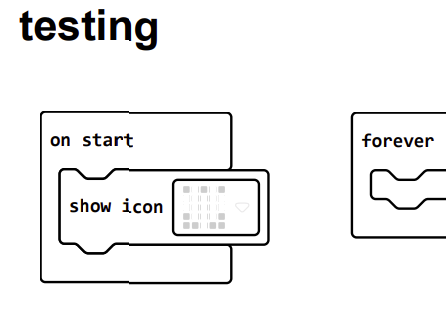
When printing, the icons in "show icon" blocks are rendered without sufficient contrast. The 'on' pixels in the icon should be rendered in black instead of white.
To Reproduce
Steps to reproduce the behavior:
- Drag the 'show icon (heart)' block into the 'on start' block.
- Click gear icon, select printing.
- Wait for the print preview dialog to show.
- Inspect the print preview.
Expected behavior
The heart icon should be black ('on' pixels) and gray ('off' pixels).
Now the 'on' pixels of the icon are white, which is not distinguishable from the background.
Screenshots
micro:bit version (please complete the following information):
Not applicable.
Desktop (please complete the following information):
- OS: Windows 10
- Browser: Firefox and Edge
- Version: makecode.microbit.org version = 4.0.18
Smartphone (please complete the following information):
Not applicable. Anyway, the fixed code should be tested on smartphones if printing is possible.
Additional context
None
Contributor guide
First steps
- Read the whole issue, then the project's contributing guide.
- Comment on the issue to say you are picking it up — it saves two people doing the same work.
- Fork the repository and make your change on a branch.
- Open a pull request that references the issue number.
Assessment
This issue has not been assessed yet.