microsoft / microsoft/pxt-microbit
iOS: JavaScript editing problems
Nobody has claimed this yet.
- Dominant language
- TypeScript
- Stars
- 804
- Forks
- 721
- Avg merge
- 2d 9h
- Merged PRs (30d)
- 2
Description
Describe the bug
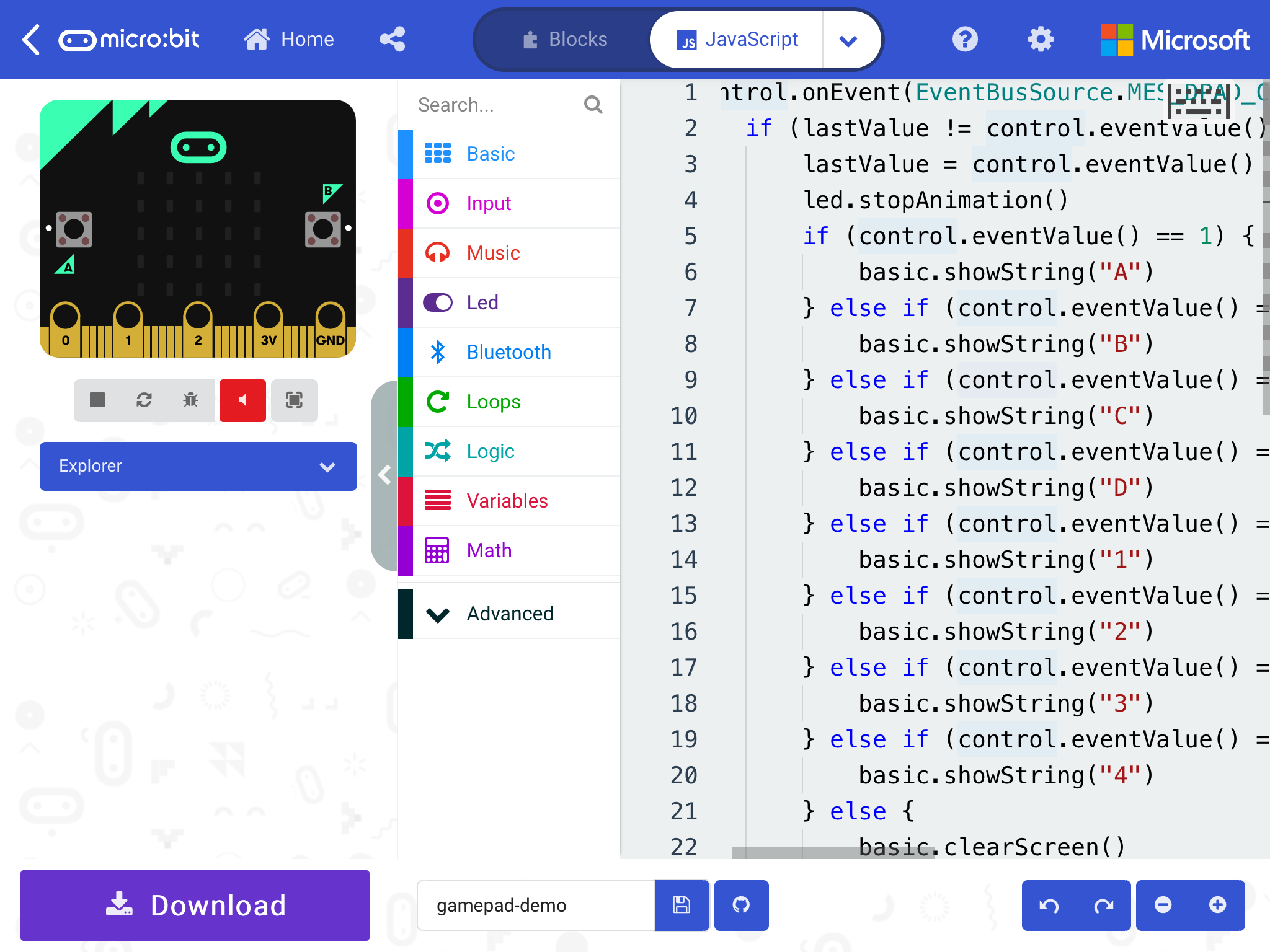
The keyboard button overlaps the JavaScript text.
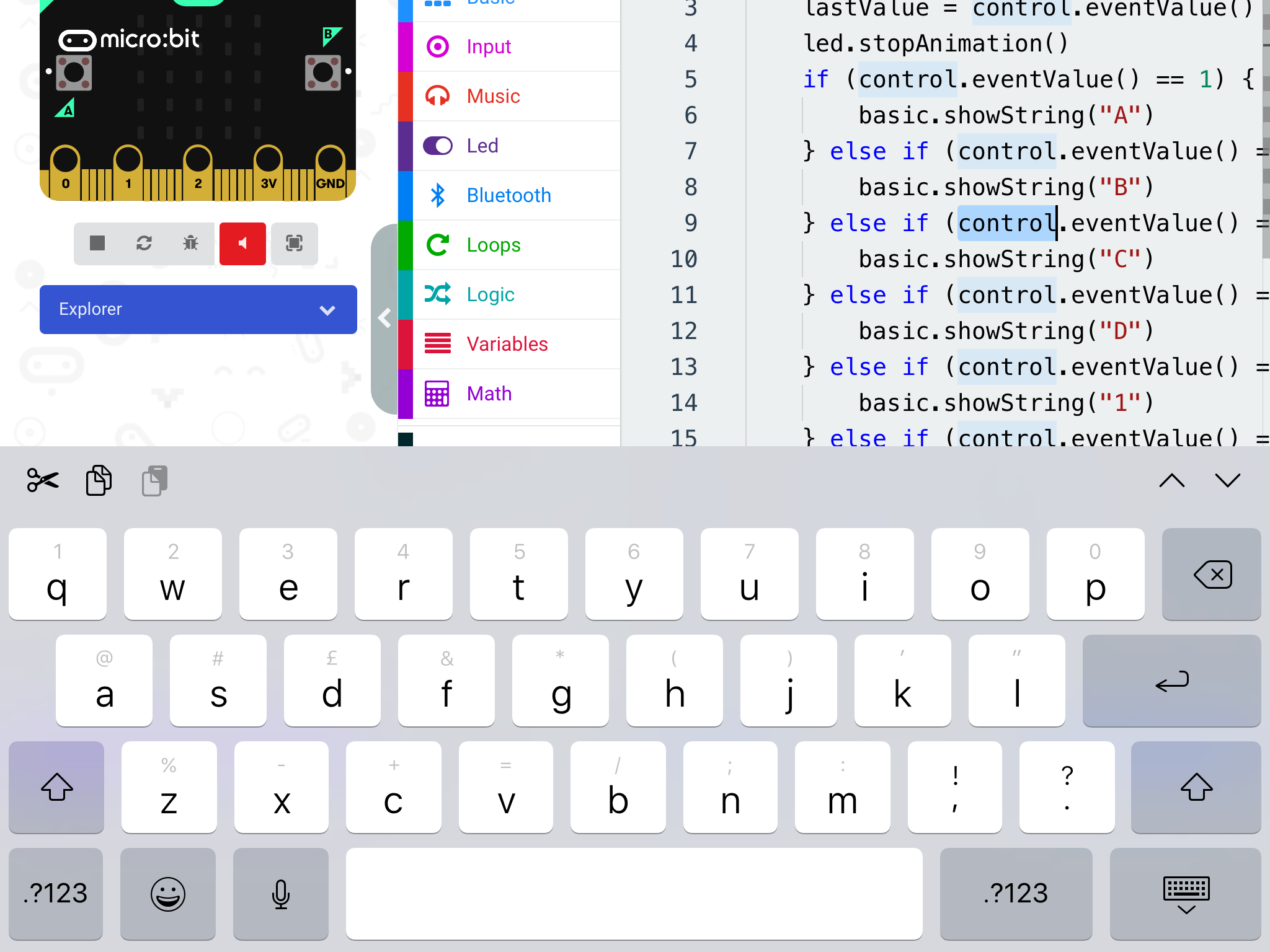
When the keyboard opens, it sometimes overlaps and obscures the JavaScript being edited, pushes up the screen when it doesn't need to, or pushes the text being edited off the top of the screen.
The menu that appears after a long-press-and-release cancels normal iOS editing behaviours, like selecting text. It has keyboard shortcuts that don't seem relevant to iOS, and many of the commands seem to be unnecessary duplicates (e.g. "Download"), or don't seem to work.
Appearance of the tooltip panels (which appear when hovering the mouse on a PC) seems unpredictable.
To Reproduce
Steps to reproduce the behaviour:
- Go to the iOS micro:bit app
- On the Flash page, select "sample:gamepad-demo"
- Tap the Edit button
- Select JavaScript
Expected behaviour
Could the keyboard button be placed so that it doesn't overlap the text? There is space to the left of the line numbers. On the other hand... why is there so much space to the left of the line numbers?
The caret should always be visible after the keyboard has opened. Should it scroll the script rather than the whole screen? Whether it pushes up the text feels quite random.
If the menu and tooltips weren't hijacking the taps and presses, would simple standard iOS editing become possible? Would the keyboard button be necessary then? Perhaps buttons to see the tooltip for the selected text, and to open the menu? I believe it's possible to add items (say "Tip" and "Help") to the iOS Edit Menus.
Screenshots
Add screenshots to help explain your problem. You can copy paste the screenshot in the github report. The .gif screen recording is very useful as well.
The text is obscured by the keyboard button
The whole screen has been pushed up by the keyboard
Desktop (please complete the following information):
- OS: [e.g. iOS]
- Browser [e.g. chrome, safari]
- Version [e.g. 22]
Smartphone (please complete the following information):
- Device: [e.g. iPhone6] iPad Air 2
- OS: [e.g. iOS8.1] iOS 13.7
- Browser [e.g. stock browser, safari] WebKit
- Version [e.g. 22]
Additional context
Add any other context about the problem here.
Contributor guide
First steps
- Read the whole issue, then the project's contributing guide.
- Comment on the issue to say you are picking it up — it saves two people doing the same work.
- Fork the repository and make your change on a branch.
- Open a pull request that references the issue number.
Research direction
Start by reproducing the problem from the iOS micro:bit app's Flash page with sample:gamepad-demo, then open Edit and select JavaScript. Investigate the editor behavior around the keyboard, caret visibility, long-press menu, and tooltip panels. Done means the keyboard does not obscure the script, the caret remains visible, and normal iOS editing behavior is not interrupted.
Written by the indexing model from the issue text.
Assessment
- Tech stack
- ios, javascript, typescript
- Domain
- frontend, mobile-dev
- Issue type
- Bug
- Difficulty
- 4/5
- Estimated time
- 3-5 days
- Activity status
- Stale
- Clarity
- Mostly clear
- Newbie friendliness
- 35/100