microsoft / microsoft/pxt-microbit
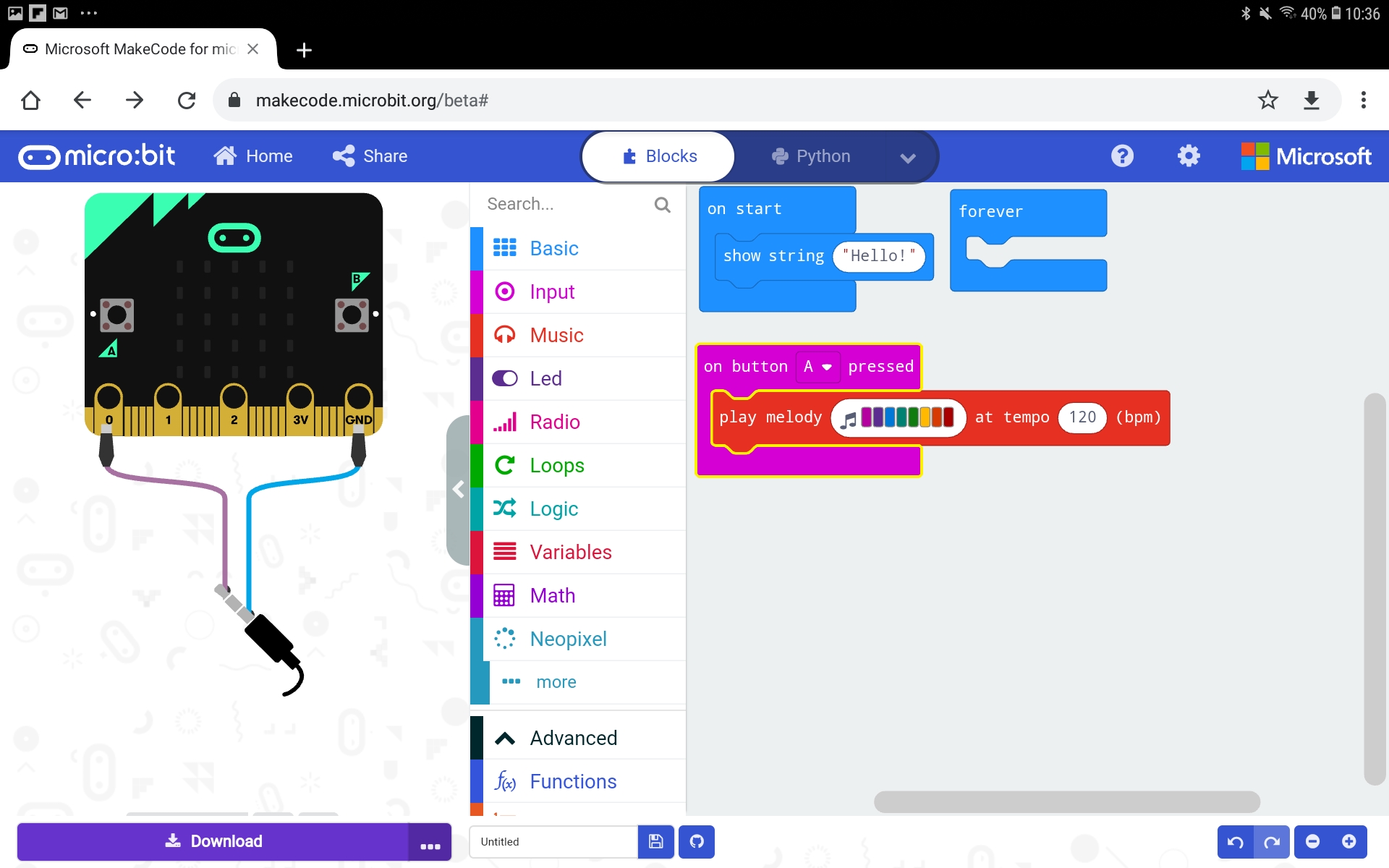
Wiring diagram pushes simulator buttons off screen in android tablet landscape mode
Nobody has claimed this yet.
- Dominant language
- TypeScript
- Stars
- 804
- Forks
- 721
- Avg merge
- 2d 9h
- Merged PRs (30d)
- 2
Description
Describe the bug
When a wiring diagram appears, the simulator buttons can get pushed off screen.
Noticed in Chrome on Samsung T580 tablet, but will presumably happen on many platforms and browsers, depending on the browser window aspect ratio.
To Reproduce
Steps to reproduce the behavior:
- Go to 'https://makecode.microbit.org/#editor'
- Add a music or neopixels block
- Resize browser window to tablet landscape aspect ratio
- See error
Expected behavior
Maybe the simulator buttons could move above the micro:bit, as they are fixed height?
Screenshots
Contributor guide
First steps
- Read the whole issue, then the project's contributing guide.
- Comment on the issue to say you are picking it up — it saves two people doing the same work.
- Fork the repository and make your change on a branch.
- Open a pull request that references the issue number.
Research direction
Start at the MakeCode editor URL and reproduce the layout in Chrome on a Samsung T580 or a browser window with a tablet landscape aspect ratio, using a music or neopixels block to show the wiring diagram. Trace the editor's responsive simulator layout and make sure the simulator buttons remain visible, potentially above the micro:bit, at that size.
Written by the indexing model from the issue text.
Assessment
- Tech stack
- typescript
- Domain
- frontend
- Issue type
- Bug
- Difficulty
- 3/5
- Estimated time
- 1-2 days
- Activity status
- Stale
- Clarity
- Mostly clear
- Newbie friendliness
- 45/100