microsoft / microsoft/pxt-microbit
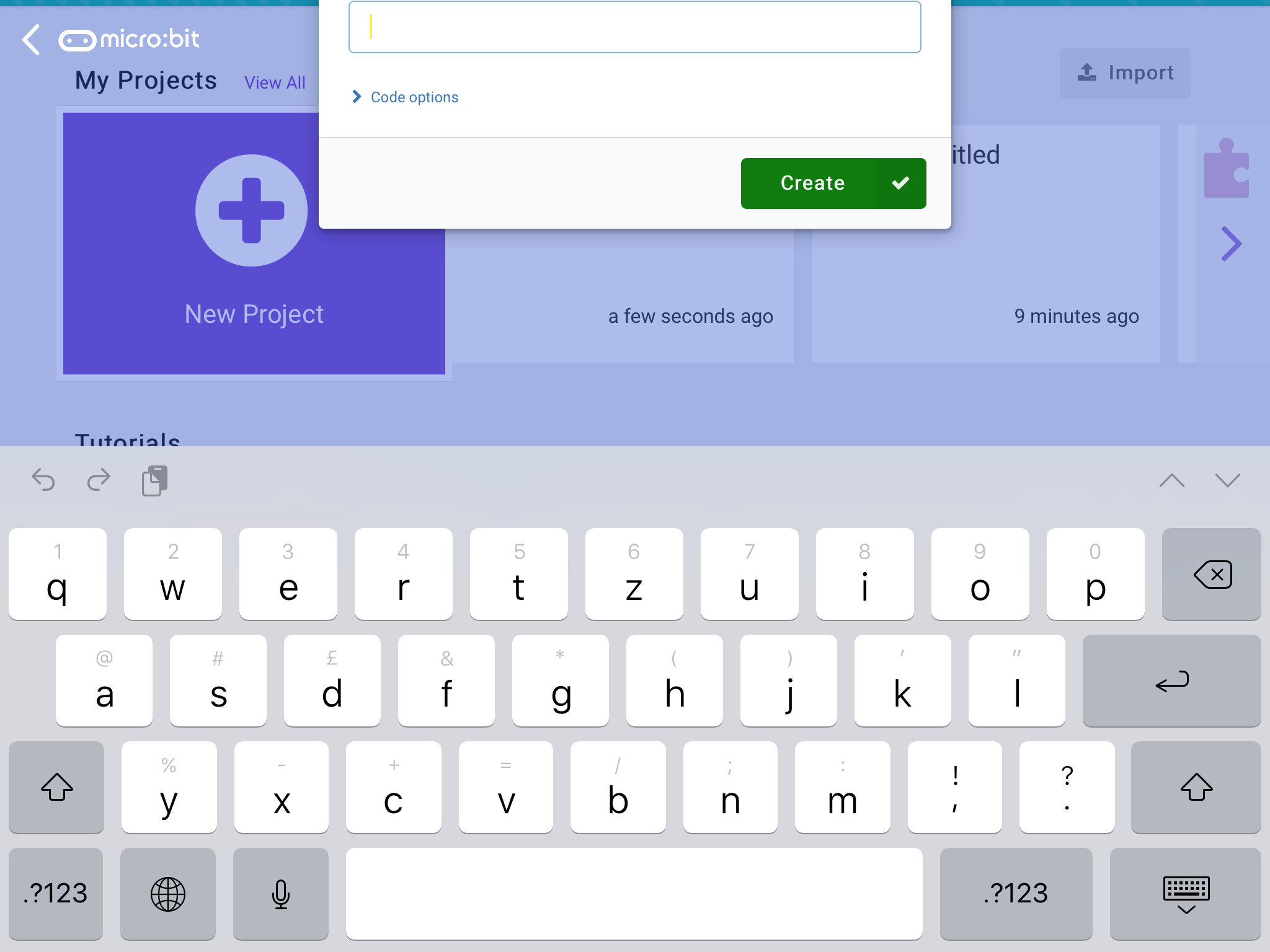
iOS - Dialogs are pushed off screen by the keyboard
A pull request for this has already been merged.
- #2852 by @pelikhan — merged
- Dominant language
- TypeScript
- Stars
- 804
- Forks
- 721
- Avg merge
- 2d 9h
- Merged PRs (30d)
- 2
Description
Describe the bug
In iOS, some dialogs get pushed off screen by the keyboard. This is not new in beta. It doesn't seem to be related to the "Request Desktop Website" setting.
Dialogues seem to get pushed off screen the first time a dialog opens. It doesn't happen if I close the keyboard and tap in the text box. This may be related to the fact that, in the webview, the keyboard opens automatically whereas in Safari, I have to tap the text box.
To Reproduce
Steps to reproduce the behavior:
- Use the iOS app.
- Tap on 'New project'
- See error
Expected behavior
As much as possible of dialogues should stay on screen. Ideally, the heading needs to be visible so the user knows what the text is for.
Screenshots
Desktop (please complete the following information):
- OS: [e.g. iOS] iOS 13.4.1 on iPad Air 2
- Browser [e.g. chrome, safari] WKWebView
- Version [e.g. 22]
Contributor guide
First steps
- Read the whole issue, then the project's contributing guide.
- Comment on the issue to say you are picking it up — it saves two people doing the same work.
- Fork the repository and make your change on a branch.
- Open a pull request that references the issue number.
Research direction
Reproduce the issue in the iOS app by opening New project with the keyboard appearing automatically, then inspect the dialog behavior. Done means the dialog remains as visible as possible, especially keeping its heading on screen; the linked pull request indicates related work has already occurred.
Written by the indexing model from the issue text.
Assessment
- Tech stack
- ios, typescript
- Domain
- frontend, mobile
- Issue type
- Bug
- Difficulty
- 4/5
- Estimated time
- 3-5 days
- Activity status
- Stale
- Clarity
- Needs clarification
- Newbie friendliness
- 25/100