microsoft / microsoft/pxt-arcade
Create new field editor for character animation predicates
@BeckHaru is already working on this.
Since Dec 14, 2021.
- Dominant language
- TypeScript
- Stars
- 546
- Forks
- 263
- Avg merge
- 7h 35m
- Merged PRs (30d)
- 46
Description
We want to extend the animation block to include predicates like in the character-animations extension. Those predicates look like this:
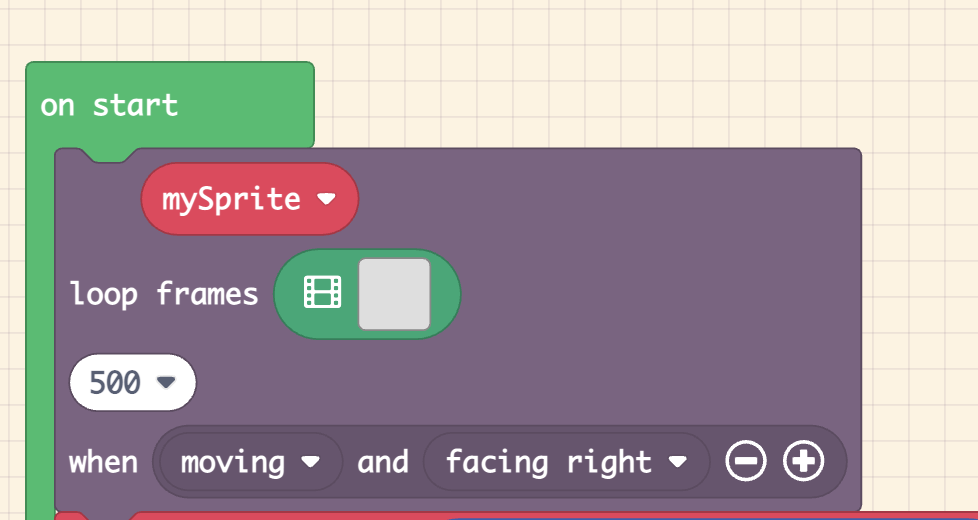
You can chain these predicates together by pressing the + button on the block and selecting more predicates from the dropdown. We want to make a field editor that makes it easier to build these chains of behaviors.
The complete list of predicates we currently have is:
- moving
- not moving
- moving left/right/up/down
- facing left/right/up/down
- hitting wall left/right/up/down
The idea is to use these to declaratively describe your sprite's behavior. For example, if I was making a platformer I might use these predicates:
- Running to the left: moving left AND hitting wall down
- Running to the right: moving right AND hitting wall down
- Jumping to the left: moving left
- Jumping to the right: moving right
- Idle facing left: not moving AND facing left
- Idle facing right: not moving AND facing right
For situations where more than one predicate applies, the most specific predicate wins. In the example above, whenever predicate 1 is true then predicate 3 must also be true, but predicate 1 will always win because it is more specific. Invalid predicates are always ignored. For example, moving left AND moving right will never be true, so applying it to an animation is a no-op. Nothing in the current UI prevents you from making these invalid predicates.
Additionally, there is currently no way to negate predicates, but that might be something we think about in the future to make things like "jumping left" read a little more clearly (i.e. moving left AND NOT hitting wall down). The only reason I left out negation in the first place was to make the dropdown less long.
Contributor guide
No contributing guide indexed for this repository
First steps
- Read the whole issue, then the project's contributing guide.
- Comment on the issue to say you are picking it up — it saves two people doing the same work.
- Fork the repository and make your change on a branch.
- Open a pull request that references the issue number.
Assessment
This issue has not been assessed yet.