microsoft / microsoft/powerbi-powershell
Include the API error detail on Resolve-PowerBIError
Open
Nobody has claimed this yet.
enhancement
- Dominant language
- C#
- Stars
- 413
- Forks
- 134
- Avg merge
- 33m
- Merged PRs (30d)
- 1
Description
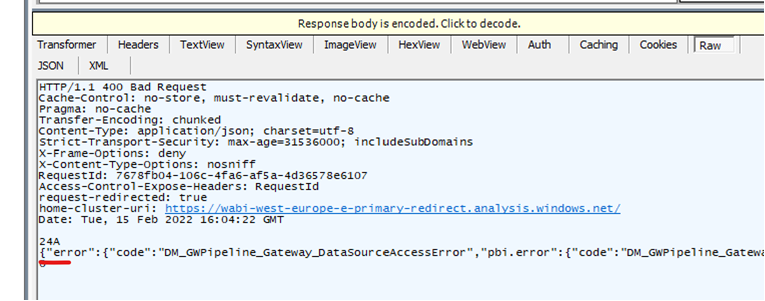
When an API fails with 400 BadRequest the body includes very valuable details to understand the error that should be returned on the exception.
Ex:
Contributor guide
First steps
- Read the whole issue, then the project's contributing guide.
- Comment on the issue to say you are picking it up — it saves two people doing the same work.
- Fork the repository and make your change on a branch.
- Open a pull request that references the issue number.
Research direction
Start by locating the Resolve-PowerBIError command or entry point and reproduce a 400 BadRequest response with an error body. Done means the resulting exception exposes the valuable API error details shown in the issue, rather than only the generic failure.
Written by the indexing model from the issue text.
Assessment
- Tech stack
- csharp, powershell
- Domain
- api, backend
- Issue type
- Bug
- Difficulty
- 3/5
- Estimated time
- 1-2 days
- Activity status
- Stale
- Clarity
- Mostly clear
- Newbie friendliness
- 45/100