microsoft / microsoft/powerbi-powershell
-PrincipalType and -Identifier parameters not recognised
Nobody has claimed this yet.
- Dominant language
- C#
- Stars
- 413
- Forks
- 134
- Avg merge
- 33m
- Merged PRs (30d)
- 1
Description
I have a powershell script that uses PowerBI PS cmdlets to add user to a workspace, and it has stopped working since yesterday. I am using the Add-PowerBIWorkspaceUser function.
My original cCmdlet call is as follows;
Add-PowerBIWorkspaceUser -Id $workspace.Id -Identifier $wUser -AccessRight $pUserRole -PrincipalType $pPrincipalType where
- $workspace.Id = ID of the workspace
- $wUser = user email address
- $pUserRole = Member or Contributor
- $pPrincipalType = User
This has started to fail since yesterday (I haven't used them in a long time). Initially it started to fail saying that identifier is not a valid parameter entry
- Add-PowerBIWorkspaceUser : A parameter cannot be found that matches parameter name 'identifier'.
I replaced identifier with UserPrincipalName and now it has started fail saying that PrincipalType is not a valid entry.
- Add-PowerBIWorkspaceUser : A parameter cannot be found that matches parameter name 'PrincipalType'.
What am I doing wrong? I have updated the PBI PowerShell modules and my versions are below;
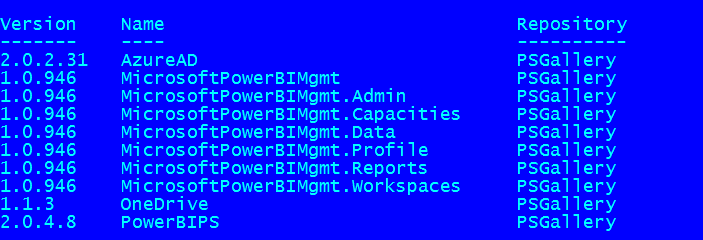
Thanks
Kaz
Contributor guide
First steps
- Read the whole issue, then the project's contributing guide.
- Comment on the issue to say you are picking it up — it saves two people doing the same work.
- Fork the repository and make your change on a branch.
- Open a pull request that references the issue number.
Research direction
Start with the Add-PowerBIWorkspaceUser cmdlet and inspect its currently supported parameters against the reported call using -Identifier, -UserPrincipalName, and -PrincipalType. Reproduce the parameter errors with the module versions shown in the issue, then verify the documented invocation and parameter behavior. Done means the cause of the rejected parameters is identified and the issue records the supported command usage.
Written by the indexing model from the issue text.
Assessment
- Tech stack
- powershell
- Domain
- cli
- Issue type
- Bug
- Difficulty
- 3/5
- Estimated time
- 1-2 days
- Activity status
- Stale
- Clarity
- Needs clarification
- Newbie friendliness
- 25/100