microsoft / microsoft/powerbi-powershell
unauthorised when calling Get-PowerBIActivityEvent as a Service Principal
Nobody has claimed this yet.
- Dominant language
- C#
- Stars
- 413
- Forks
- 134
- Avg merge
- 33m
- Merged PRs (30d)
- 1
Description
We have a service principal setup on Azure and it is a member of the Power BI administrator group
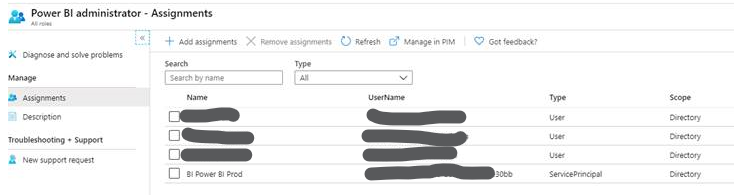
$cred = Get-Credential
Connect-PowerBIServiceAccount -ServicePrincipal -Credential $cred -Tenant <directory guid>


Environment : Public
TenantId    :
ClientId    : *******30bb
Password    : ********


PS C:\WINDOWS\system32> Get-PowerBIActivityEvent -StartDateTime 2020-02-06T00:00:00 -EndDateTime 2020-02-06T23:59:59
Get-PowerBIActivityEvent : Operation returned an invalid status code 'Unauthorized'
At line:1 char:1
+ Get-PowerBIActivityEvent -StartDateTime 2020-02-06T00:00:00 -EndDateT ...
+ ~~~~~~~~~~~~~~~~~~~~~~~~~~~~~~~~~~~~~~~~~~~~~~~~~~~~~~~~~~~~~~~~~~~~~
    + CategoryInfo          : WriteError: (Microsoft.Power...BIActivityEvent:GetPowerBIActivityEvent) [Get-PowerBIActivityEvent], HttpOperationE
   xception
    + FullyQualifiedErrorId : Operation returned an invalid status code 'Unauthorized',Microsoft.PowerBI.Commands.Admin.GetPowerBIActivityEvent

PS C:\WINDOWS\system32>  Resolve-PowerBIError -Last


   HistoryId: 61


RequestId        : ******
Response         : Unauthorized (401): {"error":{"code":"PowerBINotAuthorizedException","pbi.error":{"code":"PowerBINotAuthorizedException","para
                   meters":{},"details":[],"exceptionCulprit":1}}}
PowerBIErrorInfo :
ResponseDate     : Fri, 07 Feb 2020 13:15:50 GMT
RequestMethod    : GET
RequestUri       : https://api.powerbi.com/v1.0/myorg/admin/activityevents?startDateTime='2020-02-06T00:00:00'&endDateTime='2020-02-06T00:01:00'
InvocationInfo   : {Get-PowerBIActivityEvent}
Line             : Get-PowerBIActivityEvent -StartDateTime 2020-02-06T00:00:00 -EndDateTime 2020-02-06T00:01:00
Position         : At line:1 char:1
                   + Get-PowerBIActivityEvent -StartDateTime 2020-02-06T00:00:00 -EndDateT ...
                   + ~~~~~~~~~~~~~~~~~~~~~~~~~~~~~~~~~~~~~~~~~~~~~~~~~~~~~~~~~~~~~~~~~~~~~
StackTrace       :    at Microsoft.PowerBI.Api.V2.Admin.<GetActivityEventsWithHttpMessagesAsync>d__10.MoveNext()
                   --- End of stack trace from previous location where exception was thrown ---
                      at System.Runtime.ExceptionServices.ExceptionDispatchInfo.Throw()
                      at System.Runtime.CompilerServices.TaskAwaiter.HandleNonSuccessAndDebuggerNotification(Task task)
                      at Microsoft.PowerBI.Api.V2.AdminExtensions.<GetActivityEventsAsync>d__11.MoveNext()
                   --- End of stack trace from previous location where exception was thrown ---
                      at System.Runtime.ExceptionServices.ExceptionDispatchInfo.Throw()
                      at System.Runtime.CompilerServices.TaskAwaiter.HandleNonSuccessAndDebuggerNotification(Task task)
                      at Microsoft.PowerBI.Api.V2.AdminExtensions.GetActivityEvents(IAdmin operations, String startDateTime, String endDateTime,
                   String continuationToken, String filter)
                      at Microsoft.PowerBI.Common.Api.Admin.AdminClient.GetPowerBIActivityEvents(String startDateTime, String endDateTime,
                   String continuationToken, String filter)
                      at Microsoft.PowerBI.Commands.Admin.GetPowerBIActivityEvent.ExecuteCmdletHelper(String formattedStartDateTime, String
                   formattedEndDateTime)
                      at Microsoft.PowerBI.Commands.Admin.GetPowerBIActivityEvent.ExecuteCmdlet()
                      at Microsoft.PowerBI.Commands.Common.PowerBICmdlet.ProcessRecord()
HistoryId        : 61
This does work if I log in with a normal (user) account that is in the same role.
Are there any other permissions required? We have enabled Service Principals in the Tenant Admin area and I can't find any other documentation on this.
We need this so we can automate downloading these logs without requiring MFA
Contributor guide
First steps
- Read the whole issue, then the project's contributing guide.
- Comment on the issue to say you are picking it up — it saves two people doing the same work.
- Fork the repository and make your change on a branch.
- Open a pull request that references the issue number.
Research direction
No repository file or test is identified. Start by reproducing the shown Connect-PowerBIServiceAccount and Get-PowerBIActivityEvent commands, then compare the service principal's tenant settings and administrator-group access with the working user account. Done means identifying the missing permission or documenting that the service-principal request cannot be authorized.
Written by the indexing model from the issue text.
Assessment
- Tech stack
- azure, powershell
- Domain
- api, authentication, cloud
- Issue type
- Bug
- Difficulty
- 3/5
- Estimated time
- 1-2 days
- Activity status
- Stale
- Clarity
- Needs clarification
- Newbie friendliness
- 25/100