User Story: Extend the usage of prerequisite in OpenPAI
Nobody has claimed this yet.
- Dominant language
- JavaScript
- Stars
- 2.7k
- Forks
- 554
- Avg merge
- 20h 42m
- Merged PRs (30d)
- 14
Description
Overall
As specified in #5145, we will extend prerequisite field in the job protocol. Generally speaking, prerequisite is a sharable part within one job. Different users can share the same prerequisite to use the same data or enable the same function.
Scenes
Because prerequisites may be hard to understand by users. We could use dataset / widget to refer to different type of prerequisites in jobs.
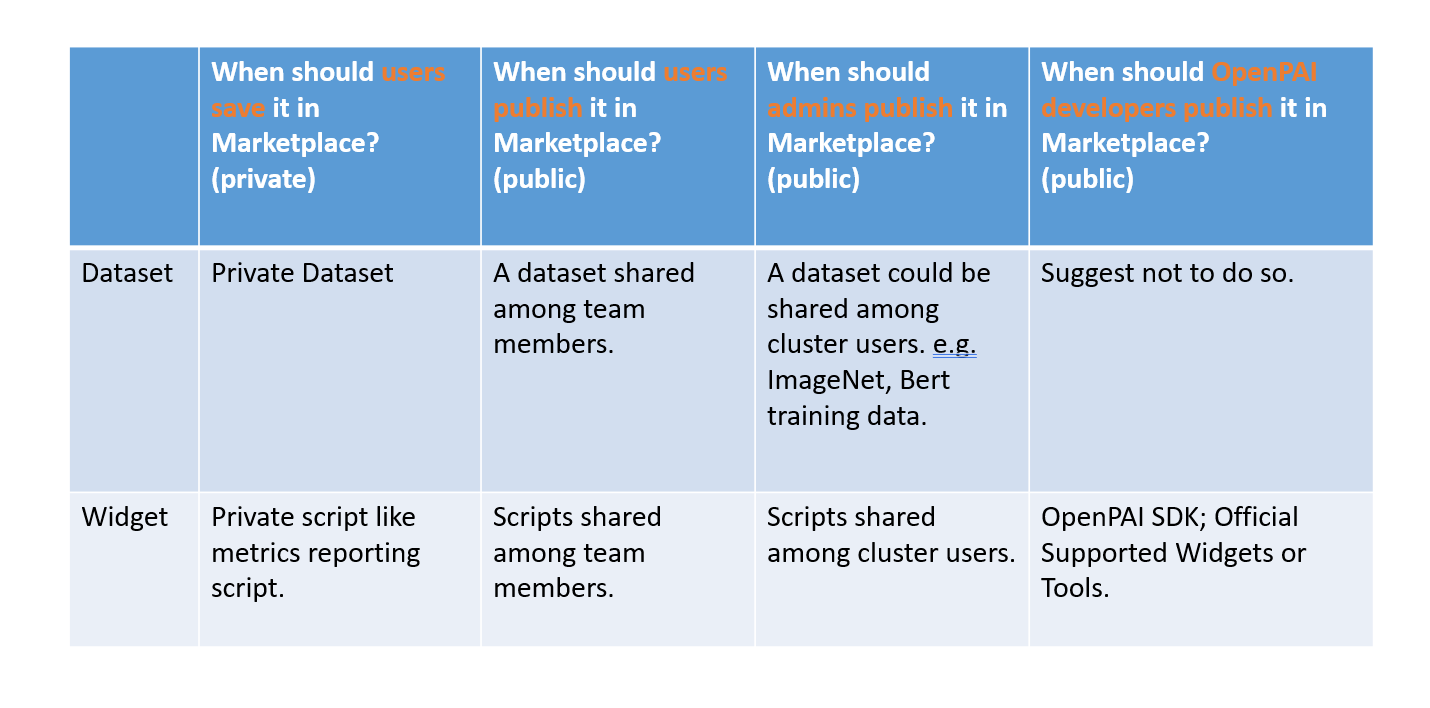
Save or Share Prerequisites
Admin/users/OpenPAI developers could define important components (e.g. storage, dataset, failure handling and debugging functions) as prerequisites and save/share them in marketplace.
Use Prerequisites
The dataset / widget can be used during job submission and on the marketplace page.
When submitting a job, user could access the prerequisites in job-submission page. By checking (or unchecking) on a drop list, user could include (or excluding) a prerequisite to this job. The job config yaml would be udpated accordingly.
- Since we support
requirein the extended prerequisite, the requirements would be checked automatically. For example, user checks a prerequisite for dataset will also include its required storage and essential packages (e.g. mounting utils) - To avoid too many prerequisite items slows the page,
marketplacewould provide the capacity of filtering (e.g. only favorite or recently used)
Compared with Runtime Plugin
It is similar to runtime plugin. Actually prerequisite will use runtime plugin as the underlying mechanism to implement it. Differences between runtime plugin and prerequisite:
prerequisiteis more close to cluster users, whileruntime pluginis more close to cluster admins.runtime pluginis the unified underlying mechnism, whileprerequisiteis more like user interface.
Full Spec
prerequisites:
  - name: covid_data
    type: data
    plugin: com.microsoft.pai.runtimeplugin.cmd #
    callbacks:
      - event: containerStart
        commands:
          - mkdir -p /data/covid19/data/
          - cd /data/covid19/data/
          - 'wget https://x.x.x/yyy.zip'
          - export DATA_DIR=/data/covid19/data/
  - name: mnist-data
    type: data
    plugin: com.microsoft.pai.runtimeplugin.cmd
    require:
      - nfs-storage-1 # also inherit parameters like mountPoint
    callbacks:
      - event: containerStart
        commands:
          - export MNIST_DIR=<% this.mountPoint %>/mnist
 - name: install-pai-copy
    type: script # indicate the purpose, not used by backend but for statistical analyzing (except dockerimage)
    plugin: com.microsoft.pai.runtimeplugin.cmd # default plugin if not specified
    callbacks:
      - event: containerStart
        commands:
          - xxx # commands to setup nodejs
          - npm install -g @swordfaith/pai_copy
    failurePolicy: ignore/fail
  - name: output-dir
    type: output
    plugin: com.microsoft.pai.runtimeplugin.cmd
    require:
      - nfs-storage-1
    callbacks:
      - event: containerStart
        commands:
          - export OUTPUT_DIR=/tmp/output
      - event: containerExit
        commands:
          - 'if [ -z ${OUTPUT_DIR+x}]; then'
          - echo "Not found OUTPUT_DIR environ"
          - else
          - pai_copy upload  paiuploadtest //
          - fi
  - name: enable-ssh
    type: script
    plugin: com.microsoft.pai.runtimeplugin.ssh
    jobssh: true
    publicKeys: # optional, if not specified, only public keys in user.extensions.sshKeys will be added
      - ... # public keys

taskRoles:
  taskrole:
    dockerImage: default_image
    prerequisites:
      - mnist-data # required will be automatically parsed and added in backend
      - output-dir
Contributor guide
No contributing guide indexed for this repository
First steps
- Read the whole issue, then the project's contributing guide.
- Comment on the issue to say you are picking it up — it saves two people doing the same work.
- Fork the repository and make your change on a branch.
- Open a pull request that references the issue number.
Research direction
Start by reading #5145 and the runtime plugin, job-submission, and marketplace entry points described here. Define the prerequisite dataset/widget flow, dependency handling, filtering, and YAML update behavior against the supplied full spec; done means users can save, share, and select prerequisites with required components included.
Written by the indexing model from the issue text.
Assessment
- Tech stack
- javascript, kubernetes, yaml
- Domain
- cloud, full-stack
- Issue type
- Feature
- Difficulty
- 5/5
- Estimated time
- Over a week
- Activity status
- Stale
- Clarity
- Needs clarification
- Newbie friendliness
- 25/100